
Help us keep the list up to date and submit new video software here.
Tool
Description
Type
Rating
Reviews
tsMuxer is a Transport Stream muxer. Remux/mux elementary streams, EVO/VOB/MPG, MKV/MKA, MP4/MOV, TS, M2TS to TS to M2TS. Supported video codecs H.264/AVC, H.265/HEVC, VC-1, MPEG2. Supported audio codecs AAC, AC3 / E-AC3(DD+), DTS/ DTS-HD. Ability to set muxing fps manually and automatically, Ability to change level for H.264 streams, Ability to shift a sound tracks, Ability to extract DTS core from DTS-HD, Ability to join files. Output/Author to compliant Blu-ray Disc or AVCHD. Blu-ray 3D support in version 1.11+. The development on the project has stopped!
Free software
OS:


File size: 7MB
Portable version
Other versions
Old versions
Version history
Alternative software
OS:
File size: 7MB
Portable version
Other versions
Old versions
Version history
Alternative software
Screenshots
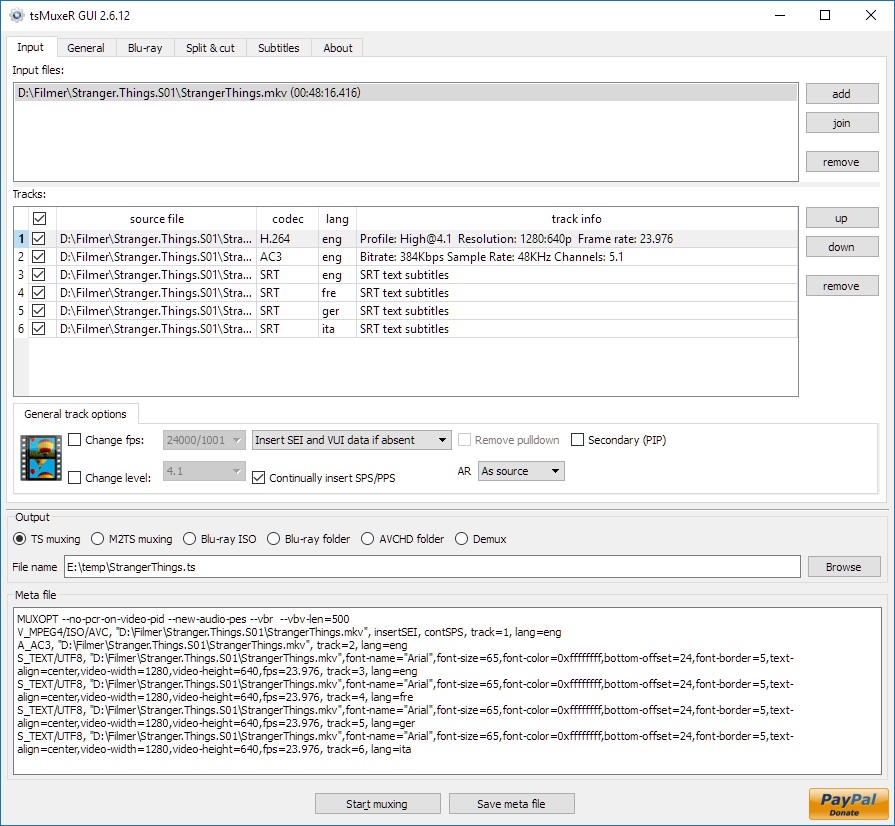
Latest version
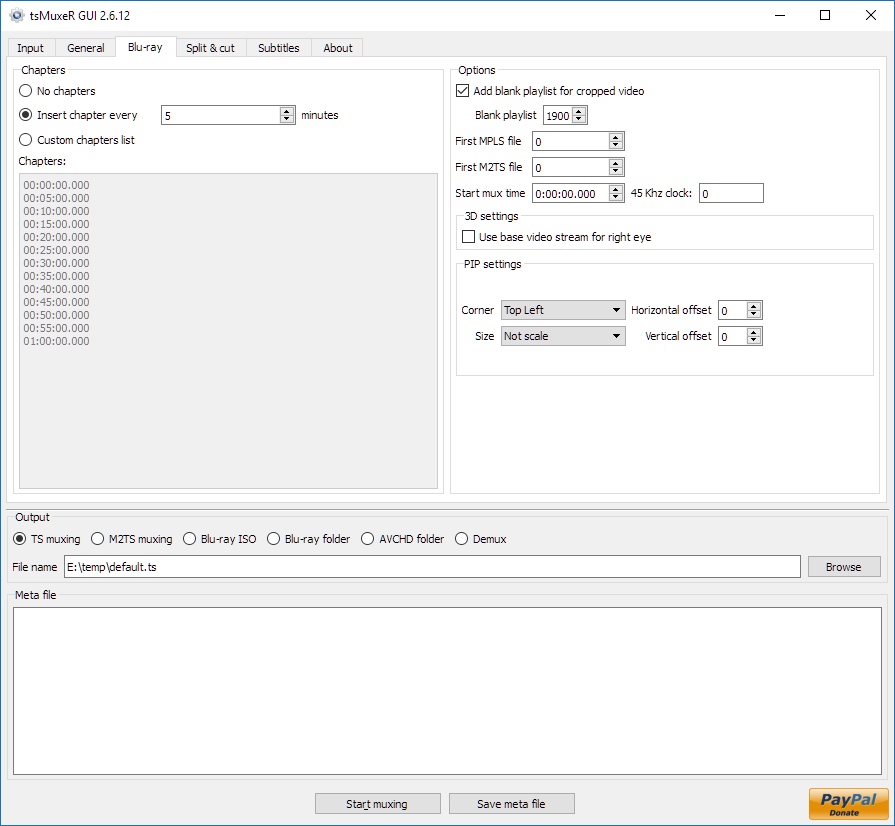
Download
Download tsMuxeR 2.7.0 Windows 64-bit 12MB Win64
Portable 
Download tsMuxeR 2.7.0 Windows 7MB Win
Portable Download tsMuxeR 2.7.0 Mac 64-bit 57MB Mac64
Download tsMuxeR 2.7.0 Linux 64-bit 33MB Linux64
Download Beta and other versions
Download tsMuxeR 2.7.1 fork Windows 42MB Win
Download tsMuxeR 2.7.1 fork Mac 74MB Mac
Download tsMuxeR 2.7.1 fork Linux 33MB Linux
Download the tsMuxer 2.7.1+ fork source code
Download old versions

Software License
Supported operating systems
Mac OS Linux More information and other downloads
Download Tsmuxer for Mac OSX Snow Leopard here
If you have problems playing your Blu-ray on Panasonic players then try reauthor it with Free AVCHD Editor. Read this forum thread for information.
If you have problems playing your Blu-ray on Panasonic players then try reauthor it with Free AVCHD Editor. Read this forum thread for information.
Version history / Release notes / Changelog / What's New
tsMuxeR 2.7.1 fork by jaminmc
Fixed file dialogs not appearing on macOS.
Fixed browse button for output folder passing wrong parameter to file dialog
MacOS now a Universal binary!
Linux release includes GUI.
Dropped Windows XP support.
https://github.com/jaminmc/tsMuxer/
Fixed file dialogs not appearing on macOS.
Fixed browse button for output folder passing wrong parameter to file dialog
MacOS now a Universal binary!
Linux release includes GUI.
Dropped Windows XP support.
https://github.com/jaminmc/tsMuxer/
View full changelog
All features
Supported incoming formats:
* TS;
* M2TS;
* Blu-ray;
* Demux option.
Supported videocodecs:
* H.264
* Microsoft VC-1;
* MPEG-2.
Supported audiocodecs:
* AAC;
* AC3 / E-AC3(DD+);
* Dolby True HD (for streams with AC3 core only);
* DTS/ DTS-HD;
* LPCM.
Supported subtitle types:
* M2TS Presentation graphic stream.
* SRT text subtitles
Supported containers and formats:
* Elementary stream;
* Transport stream TS and M2TS;
* Program stream EVO/VOB/MPG;
* Matroska MKV/MKA;
* MP4/MOV
Main features:
* Automatic or manual fps adjustment while mixing;
* Level changing as well as SEI, SPS/PPS elements and NAL unit delimiter cycle insertion while mixing H.264;
* Audio tracks and subtitles time shifting;
* Ability to extract DTS core from DTS-HD;
* Ability to extract AC3 core from True-HD;
* Ability to join files;
* Ability to adjust fps for subtitles;
* Ability to convert LPCM streams into WAVE and vice versa;
* Track language information injection into blu-ray structure and TS header;
* Ability to cut source files;
* Ability to split output file;
* Ability to detect audio delay for TS/M2TS/MPG/VOB/EVO sources;
* Ability to remove pulldown info from stream;
* Ability to open Blu-ray playlist (MPLS) files;
* Ability to convert SRT subtitles to PGS;
* Tags for SRT subtitles support - tags for changing font, color, size, etc.; tag's syntax is similar to HTML;
* United cross-platform GUI - Windows, Linux, MacOS.
* TS;
* M2TS;
* Blu-ray;
* Demux option.
Supported videocodecs:
* H.264
* Microsoft VC-1;
* MPEG-2.
Supported audiocodecs:
* AAC;
* AC3 / E-AC3(DD+);
* Dolby True HD (for streams with AC3 core only);
* DTS/ DTS-HD;
* LPCM.
Supported subtitle types:
* M2TS Presentation graphic stream.
* SRT text subtitles
Supported containers and formats:
* Elementary stream;
* Transport stream TS and M2TS;
* Program stream EVO/VOB/MPG;
* Matroska MKV/MKA;
* MP4/MOV
Main features:
* Automatic or manual fps adjustment while mixing;
* Level changing as well as SEI, SPS/PPS elements and NAL unit delimiter cycle insertion while mixing H.264;
* Audio tracks and subtitles time shifting;
* Ability to extract DTS core from DTS-HD;
* Ability to extract AC3 core from True-HD;
* Ability to join files;
* Ability to adjust fps for subtitles;
* Ability to convert LPCM streams into WAVE and vice versa;
* Track language information injection into blu-ray structure and TS header;
* Ability to cut source files;
* Ability to split output file;
* Ability to detect audio delay for TS/M2TS/MPG/VOB/EVO sources;
* Ability to remove pulldown info from stream;
* Ability to open Blu-ray playlist (MPLS) files;
* Ability to convert SRT subtitles to PGS;
* Tags for SRT subtitles support - tags for changing font, color, size, etc.; tag's syntax is similar to HTML;
* United cross-platform GUI - Windows, Linux, MacOS.
Sections/Browse similar tools
All In One MKV to MP4/Blu-ray/UHD
Authoring (Blu-ray/UHD/AVCHD)
DigitalTV/DVB/IPTV
Linux Video Tools
MacOS Video Tools
Video De/Multiplexers
Alternative to tsMuxeR
(Latest version updated)Clown_BD (May 31, 2013)
Free AVCHD Editor (Jun 9, 2011)
MakeMKV (Jan 24, 2026)
multiAVCHD (Jul 4, 2012)
ToNMT UI (Jun 1, 2009)
TsRemux (Apr 20, 2010)
Guides and How to's
Adding a subtitle on a Blu-ray Disc keeping the original menu
- ReadBasic Guide for HDV to Blu-ray
- ReadBlu-ray to MKV with optional multi-language audio/subtitle support
- ReadConvert MKV to AVCHD for PS3 and Blu-ray
- ReadHow to add menus to avcHD without re-encode the files
- ReadHow to convert a Blu-ray disc into a .MKV 720P file
- ReadHow to Decrypt/store/play Blu-Ray and HD-DVD Discs
- ReadHow to rip a Blu-ray disc and remux it to MKV
- ReadMKV H.264/AVC to VC-1 Conversion Guide
- ReadtsMuxeR video tutorials
View all guides with guide description here
Tool features - Convert
M2TS to AVCHD, M2TS to Blu-ray, MKV to AVCHD, MKV to Blu-ray, MTS to AVCHD, MTS to Blu-ray, TS to AVCHD, TS to Blu-ray
Acronyms / Also Known As
Download tsMuxeR Portable download from the Download links under Download and Download other versions!
Notify me when software updated or report software
| 117 reviews, Showing 1 to 5 reviews |
Rating by on
Jul 1, 2025 Version: 2.7
OS: Windows 11 64-bit Ease of use: 1/10
Functionality: 1/10
Value for money: 1/10
Overall: 1/10
No support for Atmos. Hope this will be supported in the next update. Fantastic software.
Review by Roger Jacobsen on
Sep 4, 2024 Version: 2.6.12
OS: Windows 11 64-bit Ease of use: 9/10
Functionality: 9/10
Value for money: 10/10
Overall: 9/10
Would be good if the program could read the subtitle in VOB format which is often in MKV files
Review by Johan on
Jul 6, 2024 Version: 2.6.12
OS: Windows 11 64-bit Ease of use: 10/10
Functionality: 10/10
Value for money: 10/10
Overall: 10/10
No Support for Atmos in Dolby Digital Plus?
Review by Dimitri on
Oct 26, 2023 Version: tsMuxeR 2.6.12 / 2023-10-25 Nightly
OS: Windows 10 64-bit Ease of use: 10/10
Functionality: 10/10
Value for money: 10/10
Overall: 10/10
Would be nice if tsmuxer could recognize Atmos in DD+
Review by Peter on
Oct 20, 2023 Version: tsMuxeR 2023-10-20 Nightly Portable Windows 64-bit
OS: Windows 10 64-bit Ease of use: 10/10
Functionality: 10/10
Value for money: 10/10
Overall: 10/10
| 117 reviews, Showing 1 to 5 reviews |
| 1 tool hits, Showing 1 to 1 tools |
Explanation:
NEW SOFTWARE= New tool since your last visit
NEW VERSION= New version since your last visit
NEW REVIEW= New review since your last visit
NEW VERSION= New version
Latest version
Version number / Beta version number / Update version number and when it whas released.
Type and download
NO MORE UPDATES? = The software hasn't been updated in over 2 years.
NO LONGER DEVELOPED = The software hasn't been updated in over 5 years.
RECENTLY UPDATED = The software has been updated the last 31 days.
Freeware = Download Free software.
Freeware Trialware = Download Free software but some parts are trial/shareware.
Free software = Download Free software and also open source code also known as FOSS (Free and Open Source Software).
Free software Trialware = Download Free software and also open source code but some parts are trial/shareware.
Freeware Ads = Download Free software but supported by advertising, usually with a included browser toolbar. It may be disabled when installing or after installation.
Free software Ads = Free Download software and open source code but supported by advertising, usually with a included browser toolbar. It may be disabled when installing or after installation.
Trialware = Also called shareware or demo. Free Trial version available for download and testing with usually a time limit or limited functions.
Payware = No demo or trial available.
Portable version = A portable/standalone version is available. No installation is required.
v1.0.1 = Latest version available.
Download beta = It could be a Beta, RC(Release Candidate) or an Alpha / Nightly / Unstable version of the software.
Download 15MB = A direct link to the software download.
Win = Windows download version for 32-bit and 64-bit Windows.
Win64 = Windows 64-bit download version for 64-bit Windows.
WinARM64 = Windows 64-bit ARM download version for Windows ARM64/AArch64.
Mac = Mac download version for 64-bit Mac OS Intel/ARM64/AArch64.
MacARM64 = Mac Silicon download version for 64-bit Mac OS ARM64/AArch64.
Mac64 = Mac OS download version for 64-bit Intel Mac OS.
Linux = Linux download version.
Linux64 = Linux download version for 64bit Linux.
Linux ARM = Linux download version for Linux ARM64/AArch64.
Portable = Portable version. No installation is required.
Ad-Supported = The software is bundled with advertising. Be careful when you install the software and disable addons that you don't want!
Visit developers site = A link to the software developer site.
Download (mirror link) = A mirror link to the software download. It may not contain the latest versions.
Download old versions = Free downloads of previous versions of the program.
Download 64-bit version = If you have a 64bit operating system you can download this version.
Download portable version = Portable/Standalone version meaning that no installation is required, just extract the files to a folder and run directly.
Portable version available = Download the portable version and you can just extract the files and run the program without installation.
Old versions available = Download old versions of the program.
Version history available = Complete changelog on our site.
= Windows version available.
= Mac OS version available.
= Linux version available.
Our hosted software are virus and malware scanned with several antivirus programs using www.virustotal.com. (NOTE! Just one virustotal warning is 99.9% a false positive. And some software might receive 2-6 warnings but it's if they are not all same virus/trojan then it's 99% false positives.)
Rating
Rating from 0-10.
NEW SOFTWARE= New tool since your last visit
NEW VERSION= New version since your last visit
NEW REVIEW= New review since your last visit
NEW VERSION= New version
Latest version
Version number / Beta version number / Update version number and when it whas released.
Type and download
NO MORE UPDATES? = The software hasn't been updated in over 2 years.
NO LONGER DEVELOPED = The software hasn't been updated in over 5 years.
RECENTLY UPDATED = The software has been updated the last 31 days.
Freeware = Download Free software.
Freeware Trialware = Download Free software but some parts are trial/shareware.
Free software = Download Free software and also open source code also known as FOSS (Free and Open Source Software).
Free software Trialware = Download Free software and also open source code but some parts are trial/shareware.
Freeware Ads = Download Free software but supported by advertising, usually with a included browser toolbar. It may be disabled when installing or after installation.
Free software Ads = Free Download software and open source code but supported by advertising, usually with a included browser toolbar. It may be disabled when installing or after installation.
Trialware = Also called shareware or demo. Free Trial version available for download and testing with usually a time limit or limited functions.
Payware = No demo or trial available.
Portable version = A portable/standalone version is available. No installation is required.
v1.0.1 = Latest version available.
Download beta = It could be a Beta, RC(Release Candidate) or an Alpha / Nightly / Unstable version of the software.
Download 15MB = A direct link to the software download.
Win = Windows download version for 32-bit and 64-bit Windows.
Win64 = Windows 64-bit download version for 64-bit Windows.
WinARM64 = Windows 64-bit ARM download version for Windows ARM64/AArch64.
Mac = Mac download version for 64-bit Mac OS Intel/ARM64/AArch64.
MacARM64 = Mac Silicon download version for 64-bit Mac OS ARM64/AArch64.
Mac64 = Mac OS download version for 64-bit Intel Mac OS.
Linux = Linux download version.
Linux64 = Linux download version for 64bit Linux.
Linux ARM = Linux download version for Linux ARM64/AArch64.
Portable = Portable version. No installation is required.
Ad-Supported = The software is bundled with advertising. Be careful when you install the software and disable addons that you don't want!
Visit developers site = A link to the software developer site.
Download (mirror link) = A mirror link to the software download. It may not contain the latest versions.
Download old versions = Free downloads of previous versions of the program.
Download 64-bit version = If you have a 64bit operating system you can download this version.
Download portable version = Portable/Standalone version meaning that no installation is required, just extract the files to a folder and run directly.
Portable version available = Download the portable version and you can just extract the files and run the program without installation.
Old versions available = Download old versions of the program.
Version history available = Complete changelog on our site.
= Windows version available. = Mac OS version available. = Linux version available.Our hosted software are virus and malware scanned with several antivirus programs using www.virustotal.com. (NOTE! Just one virustotal warning is 99.9% a false positive. And some software might receive 2-6 warnings but it's if they are not all same virus/trojan then it's 99% false positives.)
Rating
Rating from 0-10.
Browse software by sections
All In One Blu-ray Converters (9)
All In One DVD Converters (12)
All In One MKV to MP4, Blu-ray, UHD (11)
All In One Video Converters (19)
Animation (3D, 2D Animation) (12)
Audio Editors (22)
Audio Encoders (80)
Audio Players (19)
Authoring (Blu-ray, UHD, AVCHD) (13)
Authoring (DivX) (4)
Authoring (DVD) (26)
Authoring (SVCD, VCD) (9)
Bitrate Calculators (7)
Blu-ray to AVI, MKV, MP4 (15)
Blu-ray to Blu-ray, AVCHD (10)
Burn (CD,DVD,Blu-ray) (24)
Camcorders, DV, HDV, AVCHD (31)
Capture TV, DVD, VCR (30)
CD, DVD, Blu-ray recovery (3)
Codec Packs (6)
All In One DVD Converters (12)
All In One MKV to MP4, Blu-ray, UHD (11)
All In One Video Converters (19)
Animation (3D, 2D Animation) (12)
Audio Editors (22)
Audio Encoders (80)
Audio Players (19)
Authoring (Blu-ray, UHD, AVCHD) (13)
Authoring (DivX) (4)
Authoring (DVD) (26)
Authoring (SVCD, VCD) (9)
Bitrate Calculators (7)
Blu-ray to AVI, MKV, MP4 (15)
Blu-ray to Blu-ray, AVCHD (10)
Burn (CD,DVD,Blu-ray) (24)
Camcorders, DV, HDV, AVCHD (31)
Capture TV, DVD, VCR (30)
CD, DVD, Blu-ray recovery (3)
Codec Packs (6)
Codec, Video Identifiers (30)
Codecs (67)
Decrypters (DVD Rippers) (16)
Decrypters (UHD, Blu-ray Rippers) (8)
DigitalTV, DVB, IPTV (39)
DVD to DVD (20)
DVD to MP4, MKV, H264, H265 (16)
DVD to VCD, SVCD (5)
DVD to XviD, AVI, DivX (16)
ISO, Image (15)
Linux Video Tools (208)
MacOS Video Tools (244)
Media (Blu-ray, DVD, CD) (9)
Media Center, HTPC (24)
Other Useful Tools (140)
Photo Blu-ray, DVD, SlideShow (8)
Portable (Mobile, PSP) (35)
Region Free Tools (5)
Screen capture , Screen recording (27)
Screenshots , Thumbnails (13)
Codecs (67)
Decrypters (DVD Rippers) (16)
Decrypters (UHD, Blu-ray Rippers) (8)
DigitalTV, DVB, IPTV (39)
DVD to DVD (20)
DVD to MP4, MKV, H264, H265 (16)
DVD to VCD, SVCD (5)
DVD to XviD, AVI, DivX (16)
ISO, Image (15)
Linux Video Tools (208)
MacOS Video Tools (244)
Media (Blu-ray, DVD, CD) (9)
Media Center, HTPC (24)
Other Useful Tools (140)
Photo Blu-ray, DVD, SlideShow (8)
Portable (Mobile, PSP) (35)
Region Free Tools (5)
Screen capture , Screen recording (27)
Screenshots , Thumbnails (13)
Subtitle Editors, Converters (72)
Tag Editors (4)
Video De, Multiplexers (66)
Video Editors (Advanced, NLE) (35)
Video Editors (Basic) (56)
Video Editors (H264, MP4, MKV, MTS) (19)
Video Editors (Lossless) (4)
Video Editors (MPG, DVD) (16)
Video Editors (WMV, AVI) (15)
Video Encoders (AV1, VP8, VP9) (2)
Video Encoders (AVI, WMV) (38)
Video Encoders (H264, H265, MP4, MKV) (45)
Video Encoders (MPG, DVD) (23)
Video Encoders , Converters (155)
Video Frameservers (9)
Video Players (49)
Video Repair, Fix (24)
Video Scripting (10)
Video Streaming (21)
Video Streaming Downloaders (101)
Tag Editors (4)
Video De, Multiplexers (66)
Video Editors (Advanced, NLE) (35)
Video Editors (Basic) (56)
Video Editors (H264, MP4, MKV, MTS) (19)
Video Editors (Lossless) (4)
Video Editors (MPG, DVD) (16)
Video Editors (WMV, AVI) (15)
Video Encoders (AV1, VP8, VP9) (2)
Video Encoders (AVI, WMV) (38)
Video Encoders (H264, H265, MP4, MKV) (45)
Video Encoders (MPG, DVD) (23)
Video Encoders , Converters (155)
Video Frameservers (9)
Video Players (49)
Video Repair, Fix (24)
Video Scripting (10)
Video Streaming (21)
Video Streaming Downloaders (101)