
Help us keep the list up to date and submit new video software here.
Tool
Description
Type
Rating
Reviews
Unreal media server is a Streaming Server for Windows. Both media files: AVI (DivX, XVid), MPEG-1/2, MPA, WMV, WMA, ASF, MP3, QuickTime and Live media sources include: digital cameras, microphones, TV-tuners, analog video sources (analog camera or TV) connected to Video card or to FrameGrabber card that supports DirectShow interface. Free version limitations: 5 live broadcasts can be configured, 10 concurrent player connections can be served. The Live Server is our live media encoder that encodes, transcodes, streams and records live audio/video sources using H.264, VC1(WMV9), VP8/VP9, WMA, MP3, AAC, Opus and other codecs. The Live Server supports any USB camera/device, capture cards and screen capture.
Screenshots
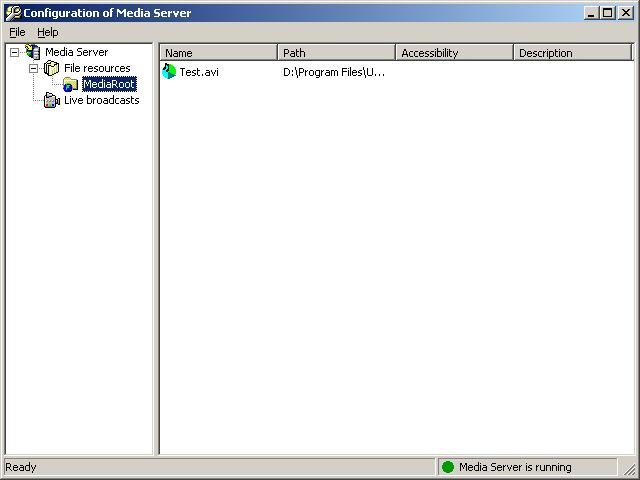
Latest version
Download
Download Unreal Media Server 15.0 64-bit 9MB Win64

Download Unreal Media Server 15.0 7MB Win
Download Beta and other versions
Download old versions

Software License
Supported operating systems
Version history / Release notes / Changelog / What's New
January 2, 2023: Unreal Media Server v15.0 Release Notes.
RTSP server: streaming out via RTSP protocol.
Full SRT protocol support: ingesting live MPEG2-TS streams over SRT and publishing MPEG2-TS streams over SRT.
Support for streaming HEVC (H.265) video to HTML5 MSE player.
Improved HLS and MPEG2-TS streaming.
Security and performance improvements.
RTSP server: streaming out via RTSP protocol.
Full SRT protocol support: ingesting live MPEG2-TS streams over SRT and publishing MPEG2-TS streams over SRT.
Support for streaming HEVC (H.265) video to HTML5 MSE player.
Improved HLS and MPEG2-TS streaming.
Security and performance improvements.
View full changelog
All features
Unreal Media Server is a software streaming server for Windows operating systems, offering rich choice of live and on demand streaming functionality.
The server supports live media sources and recorded media files.
File formats include all the types supported by Microsoft DirectX, namely:
AVI, MPEG-1 (VCD), MPEG-2 (SVCD, DVD), MPEG-4, MPA, WMV, WMA, ASF, MP3, QuickTime (version 2 and lower). Other file formats and compression types are supported with additional installation of corresponding codecs, such as DivX, XVid, VP6, MP4, AC3, H.264.
Unreal Media Server does not transcode or decode files when streaming; the files are streamed "as is"; the player is able to playback these files if appropriate codecs are installed on player's computer.
Playlist functionality allows automatically playing all the files of server's virtual folder in a loop mode. Files can be unicasted in "on-demand" mode or multicasted in "live" mode.
Supported live media sources include: USB/Firewire digital cameras, IP network cameras, microphones, TV-tuner cards, analog video sources (analog camera or TV) connected to Graphics card, Video Capture card or hardware encoder appliance that supports DirectShow interface. There can be multiple live sources on a single computer. Hardware-encoded content can be streamed "as is" without software transcoding.
Codecs used for live video compression: VC1 (WMV9), H.264 and Microsoft MPEG-4 V2. Codecs used for live audio compression: Fraunhofer MPEG Layer-3 (MP3), GSM 6.10 and WMA.
Two streaming delivery modes are supported: Near-Real-Time and Buffered. Conferencing applications requiring low latency can take advantage of 0.2 - 2 seconds latency provided by Near-Real-Time mode, where buffer sizes are minimal and aggressive leaking-flushing bucket algorithms are enforced. When low latency is not required, Buffered mode can be used, allowing servers to buffer media in order to compensate on network jitter and congestions.
Live content can be recorded based on scheduler or motion detection, independently of streaming.
Unreal Media Server supports variety of streaming protocols allowing playing with Flash player, Silverlight, Windows Media Player and Unreal Streaming Media Player on Windows, MAC, Linux and Mobile devices.
RTMP protocol can be used for streaming to Flash player; MMS-H protocol serves for streaming to Silverlight, Windows Media Player and other MMS-capable players. Our own proprietary, codec-independent streaming protocol is used for streaming to Unreal Streaming Media Player. Our protocol can be realized via TCP-unicast streams, RTP Multicast streams and HTTP(S) unicast streams via IIS web server.
Unreal Streaming Media Player run on Windows PCs and on Handheld Devices running Windows Mobile 5 or higher operating system. Player can be embedded into web page as an ActiveX control for IE browser or as a plugin for Firefox, Netscape, Mozilla, Safari, Opera and Chrome.
Incoming content is not stored on client computer's hard disk and user is not allowed to save media locally, thus author's rights are fully protected.
User authentication and access restrictions enable trusted access to media resources. User logging provides means to track user activity.
SDK allows automation and customization of Server behavior.
The server supports live media sources and recorded media files.
File formats include all the types supported by Microsoft DirectX, namely:
AVI, MPEG-1 (VCD), MPEG-2 (SVCD, DVD), MPEG-4, MPA, WMV, WMA, ASF, MP3, QuickTime (version 2 and lower). Other file formats and compression types are supported with additional installation of corresponding codecs, such as DivX, XVid, VP6, MP4, AC3, H.264.
Unreal Media Server does not transcode or decode files when streaming; the files are streamed "as is"; the player is able to playback these files if appropriate codecs are installed on player's computer.
Playlist functionality allows automatically playing all the files of server's virtual folder in a loop mode. Files can be unicasted in "on-demand" mode or multicasted in "live" mode.
Supported live media sources include: USB/Firewire digital cameras, IP network cameras, microphones, TV-tuner cards, analog video sources (analog camera or TV) connected to Graphics card, Video Capture card or hardware encoder appliance that supports DirectShow interface. There can be multiple live sources on a single computer. Hardware-encoded content can be streamed "as is" without software transcoding.
Codecs used for live video compression: VC1 (WMV9), H.264 and Microsoft MPEG-4 V2. Codecs used for live audio compression: Fraunhofer MPEG Layer-3 (MP3), GSM 6.10 and WMA.
Two streaming delivery modes are supported: Near-Real-Time and Buffered. Conferencing applications requiring low latency can take advantage of 0.2 - 2 seconds latency provided by Near-Real-Time mode, where buffer sizes are minimal and aggressive leaking-flushing bucket algorithms are enforced. When low latency is not required, Buffered mode can be used, allowing servers to buffer media in order to compensate on network jitter and congestions.
Live content can be recorded based on scheduler or motion detection, independently of streaming.
Unreal Media Server supports variety of streaming protocols allowing playing with Flash player, Silverlight, Windows Media Player and Unreal Streaming Media Player on Windows, MAC, Linux and Mobile devices.
RTMP protocol can be used for streaming to Flash player; MMS-H protocol serves for streaming to Silverlight, Windows Media Player and other MMS-capable players. Our own proprietary, codec-independent streaming protocol is used for streaming to Unreal Streaming Media Player. Our protocol can be realized via TCP-unicast streams, RTP Multicast streams and HTTP(S) unicast streams via IIS web server.
Unreal Streaming Media Player run on Windows PCs and on Handheld Devices running Windows Mobile 5 or higher operating system. Player can be embedded into web page as an ActiveX control for IE browser or as a plugin for Firefox, Netscape, Mozilla, Safari, Opera and Chrome.
Incoming content is not stored on client computer's hard disk and user is not allowed to save media locally, thus author's rights are fully protected.
User authentication and access restrictions enable trusted access to media resources. User logging provides means to track user activity.
SDK allows automation and customization of Server behavior.
Sections/Browse similar tools
Guides and How to's
Acronyms / Also Known As
Notify me when software updated or report software
| 3 reviews, Showing 1 to 3 reviews |
It would be nice, to avoiding a big waste of time spent to learn how to make this thing work, if somewhere will appear a small string like this: "max resolution = 320x240" (the same max resolution of the oldest webcam of the 90's).
Thank you.
Thank you.
Review by garbage2 on
May 10, 2008 Version: 5.5
OS: WinXP Ease of use: 3/10
Functionality: 1/10
Value for money: 1/10
Overall: 4/10
Editors of 3d2f.com have done independent review of Unreal Media Server:
http://3d2f.com/smartreviews/0-362-unreal-media-s ... read.shtml
We recommend this tool for audio/video streaming over IP networks.
3d2f Team.
http://3d2f.com/smartreviews/0-362-unreal-media-s ... read.shtml
We recommend this tool for audio/video streaming over IP networks.
3d2f Team.
Review by DVBoghen on
Jul 12, 2007 Version: 5.0
OS: WinXP Ease of use: 10/10
Functionality: 10/10
Value for money: 10/10
Overall: 10/10
This is an awesome and powerful video streaming tool.
You can stream almost any video format without having to re-encode.
You can also stream live broadcast off your tv tuner without consuming an absurd amount of resources - hence Video Lan.
Also non like Video lan you are granted an easy ability to change live broadcast channels over a LAN or WAN without any difficulty.
There are a few drawbacks:
1)The media server only re-encodes to a certain resolution.
2)At times the sound encoding is blotchy.
3)The installation is not as easy as it could be. Thus do not expect to be able to install or understand all the features of this software server if you are not pc literate or if you are new to media encoding or streaming.
The best installation results will occur when you setup the Unreal Media Streaming Server on Windows 2003; and install the Unreal Live Server on a seperate non NT native Windows OS to host your tv tuner.
You can stream almost any video format without having to re-encode.
You can also stream live broadcast off your tv tuner without consuming an absurd amount of resources - hence Video Lan.
Also non like Video lan you are granted an easy ability to change live broadcast channels over a LAN or WAN without any difficulty.
There are a few drawbacks:
1)The media server only re-encodes to a certain resolution.
2)At times the sound encoding is blotchy.
3)The installation is not as easy as it could be. Thus do not expect to be able to install or understand all the features of this software server if you are not pc literate or if you are new to media encoding or streaming.
The best installation results will occur when you setup the Unreal Media Streaming Server on Windows 2003; and install the Unreal Live Server on a seperate non NT native Windows OS to host your tv tuner.
Review by better_tomorrow on
Jun 5, 2006 Version: 4.0
OS: WinXP Ease of use: 10/10
Functionality: 10/10
Value for money: 10/10
Overall: 10/10
| 3 reviews, Showing 1 to 3 reviews |
| 1 tool hits, Showing 1 to 1 tools |
Explanation:
NEW SOFTWARE= New tool since your last visit
NEW VERSION= New version since your last visit
NEW REVIEW= New review since your last visit
NEW VERSION= New version
Latest version
Version number / Beta version number / Update version number and when it whas released.
Type and download
NO MORE UPDATES? = The software hasn't been updated in over 2 years.
NO LONGER DEVELOPED = The software hasn't been updated in over 5 years.
RECENTLY UPDATED = The software has been updated the last 31 days.
Freeware = Download Free software.
Freeware Trialware = Download Free software but some parts are trial/shareware.
Free software = Download Free software and also open source code also known as FOSS (Free and Open Source Software).
Free software Trialware = Download Free software and also open source code but some parts are trial/shareware.
Freeware Ads = Download Free software but supported by advertising, usually with a included browser toolbar. It may be disabled when installing or after installation.
Free software Ads = Free Download software and open source code but supported by advertising, usually with a included browser toolbar. It may be disabled when installing or after installation.
Trialware = Also called shareware or demo. Free Trial version available for download and testing with usually a time limit or limited functions.
Payware = No demo or trial available.
Portable version = A portable/standalone version is available. No installation is required.
v1.0.1 = Latest version available.
Download beta = It could be a Beta, RC(Release Candidate) or an Alpha / Nightly / Unstable version of the software.
Download 15MB = A direct link to the software download.
Win = Windows download version. It works on 32-bit and 64-bit Windows.
Win64 = Windows 64-bit download version. It works only on 64-bit Windows.
Mac = Mac download version. It works on 32-bit and 64-bit Mac OS.
Mac64 = Mac OS download version. It works only on 64-bit Mac OS.
Linux = Linux download version.
Portable = Portable version. No installation is required.
Ad-Supported = The software is bundled with advertising. Be careful when you install the software and disable addons that you don't want!
Visit developers site = A link to the software developer site.
Download (mirror link) = A mirror link to the software download. It may not contain the latest versions.
Download old versions = Free downloads of previous versions of the program.
Download 64-bit version = If you have a 64bit operating system you can download this version.
Download portable version = Portable/Standalone version meaning that no installation is required, just extract the files to a folder and run directly.
Portable version available = Download the portable version and you can just extract the files and run the program without installation.
Old versions available = Download old versions of the program.
Version history available = Complete changelog on our site.
= Windows version available.
 = Mac OS version available.
 = Linux version available.
Our hosted software are virus and malware scanned with several antivirus programs using www.virustotal.com. (NOTE! Just one virustotal warning is 99.9% a false positive. And some software might receive 2-6 warnings but it's if they are not all same virus/trojan then it's 99% false positives.)
Rating
Rating from 0-10.
NEW SOFTWARE= New tool since your last visit
NEW VERSION= New version since your last visit
NEW REVIEW= New review since your last visit
NEW VERSION= New version
Latest version
Version number / Beta version number / Update version number and when it whas released.
Type and download
NO MORE UPDATES? = The software hasn't been updated in over 2 years.
NO LONGER DEVELOPED = The software hasn't been updated in over 5 years.
RECENTLY UPDATED = The software has been updated the last 31 days.
Freeware = Download Free software.
Freeware Trialware = Download Free software but some parts are trial/shareware.
Free software = Download Free software and also open source code also known as FOSS (Free and Open Source Software).
Free software Trialware = Download Free software and also open source code but some parts are trial/shareware.
Freeware Ads = Download Free software but supported by advertising, usually with a included browser toolbar. It may be disabled when installing or after installation.
Free software Ads = Free Download software and open source code but supported by advertising, usually with a included browser toolbar. It may be disabled when installing or after installation.
Trialware = Also called shareware or demo. Free Trial version available for download and testing with usually a time limit or limited functions.
Payware = No demo or trial available.
Portable version = A portable/standalone version is available. No installation is required.
v1.0.1 = Latest version available.
Download beta = It could be a Beta, RC(Release Candidate) or an Alpha / Nightly / Unstable version of the software.
Download 15MB = A direct link to the software download.
Win = Windows download version. It works on 32-bit and 64-bit Windows.
Win64 = Windows 64-bit download version. It works only on 64-bit Windows.
Mac = Mac download version. It works on 32-bit and 64-bit Mac OS.
Mac64 = Mac OS download version. It works only on 64-bit Mac OS.
Linux = Linux download version.
Portable = Portable version. No installation is required.
Ad-Supported = The software is bundled with advertising. Be careful when you install the software and disable addons that you don't want!
Visit developers site = A link to the software developer site.
Download (mirror link) = A mirror link to the software download. It may not contain the latest versions.
Download old versions = Free downloads of previous versions of the program.
Download 64-bit version = If you have a 64bit operating system you can download this version.
Download portable version = Portable/Standalone version meaning that no installation is required, just extract the files to a folder and run directly.
Portable version available = Download the portable version and you can just extract the files and run the program without installation.
Old versions available = Download old versions of the program.
Version history available = Complete changelog on our site.
= Windows version available. = Mac OS version available. = Linux version available.Our hosted software are virus and malware scanned with several antivirus programs using www.virustotal.com. (NOTE! Just one virustotal warning is 99.9% a false positive. And some software might receive 2-6 warnings but it's if they are not all same virus/trojan then it's 99% false positives.)
Rating
Rating from 0-10.
Browse software by sections
All In One Blu-ray Converters (9)
All In One DVD Converters (12)
All In One MKV to MP4, Blu-ray, UHD (11)
All In One Video Converters (19)
Animation (3D, 2D Animation) (11)
Audio Editors (21)
Audio Encoders (80)
Audio Players (19)
Authoring (Blu-ray, UHD, AVCHD) (12)
Authoring (DivX) (4)
Authoring (DVD) (26)
Authoring (SVCD, VCD) (9)
Bitrate Calculators (7)
Blu-ray to AVI, MKV, MP4 (15)
Blu-ray to Blu-ray, AVCHD (10)
Burn (CD,DVD,Blu-ray) (24)
Camcorders, DV, HDV, AVCHD (31)
Capture TV, DVD, VCR (30)
CD, DVD, Blu-ray recovery (3)
Codec Packs (6)
All In One DVD Converters (12)
All In One MKV to MP4, Blu-ray, UHD (11)
All In One Video Converters (19)
Animation (3D, 2D Animation) (11)
Audio Editors (21)
Audio Encoders (80)
Audio Players (19)
Authoring (Blu-ray, UHD, AVCHD) (12)
Authoring (DivX) (4)
Authoring (DVD) (26)
Authoring (SVCD, VCD) (9)
Bitrate Calculators (7)
Blu-ray to AVI, MKV, MP4 (15)
Blu-ray to Blu-ray, AVCHD (10)
Burn (CD,DVD,Blu-ray) (24)
Camcorders, DV, HDV, AVCHD (31)
Capture TV, DVD, VCR (30)
CD, DVD, Blu-ray recovery (3)
Codec Packs (6)
Codec, Video Identifiers (30)
Codecs (67)
Decrypters (DVD Rippers) (15)
Decrypters (UHD, Blu-ray Rippers) (8)
DigitalTV, DVB, IPTV (38)
DVD to DVD (20)
DVD to MP4, MKV, H264, H265 (16)
DVD to VCD, SVCD (5)
DVD to XviD, AVI, DivX (16)
ISO, Image (16)
Linux Video Tools (192)
MacOS Video Tools (228)
Media (Blu-ray, DVD, CD) (9)
Media Center, HTPC (23)
Other Useful Tools (141)
Photo Blu-ray, DVD, SlideShow (8)
Portable (Mobile, PSP) (35)
Region Free Tools (5)
Screen capture , Screen recording (27)
Screenshots , Thumbnails (13)
Codecs (67)
Decrypters (DVD Rippers) (15)
Decrypters (UHD, Blu-ray Rippers) (8)
DigitalTV, DVB, IPTV (38)
DVD to DVD (20)
DVD to MP4, MKV, H264, H265 (16)
DVD to VCD, SVCD (5)
DVD to XviD, AVI, DivX (16)
ISO, Image (16)
Linux Video Tools (192)
MacOS Video Tools (228)
Media (Blu-ray, DVD, CD) (9)
Media Center, HTPC (23)
Other Useful Tools (141)
Photo Blu-ray, DVD, SlideShow (8)
Portable (Mobile, PSP) (35)
Region Free Tools (5)
Screen capture , Screen recording (27)
Screenshots , Thumbnails (13)
Subtitle Editors, Converters (70)
Tag Editors (3)
Video De, Multiplexers (66)
Video Editors (Advanced, NLE) (34)
Video Editors (Basic) (53)
Video Editors (H264, MP4, MKV, MTS) (19)
Video Editors (Lossless) (4)
Video Editors (MPG, DVD) (16)
Video Editors (WMV, AVI) (15)
Video Encoders (AV1, VP8, VP9) (2)
Video Encoders (AVI, WMV) (38)
Video Encoders (H264, H265, MP4, MKV) (45)
Video Encoders (MPG, DVD) (23)
Video Encoders , Converters (154)
Video Frameservers (9)
Video Players (48)
Video Repair, Fix (25)
Video Scripting (11)
Video Streaming (21)
Video Streaming Downloaders (101)
Tag Editors (3)
Video De, Multiplexers (66)
Video Editors (Advanced, NLE) (34)
Video Editors (Basic) (53)
Video Editors (H264, MP4, MKV, MTS) (19)
Video Editors (Lossless) (4)
Video Editors (MPG, DVD) (16)
Video Editors (WMV, AVI) (15)
Video Encoders (AV1, VP8, VP9) (2)
Video Encoders (AVI, WMV) (38)
Video Encoders (H264, H265, MP4, MKV) (45)
Video Encoders (MPG, DVD) (23)
Video Encoders , Converters (154)
Video Frameservers (9)
Video Players (48)
Video Repair, Fix (25)
Video Scripting (11)
Video Streaming (21)
Video Streaming Downloaders (101)