
Help us keep the list up to date and submit new video software here.
Tool
Description
Type
Rating
Reviews
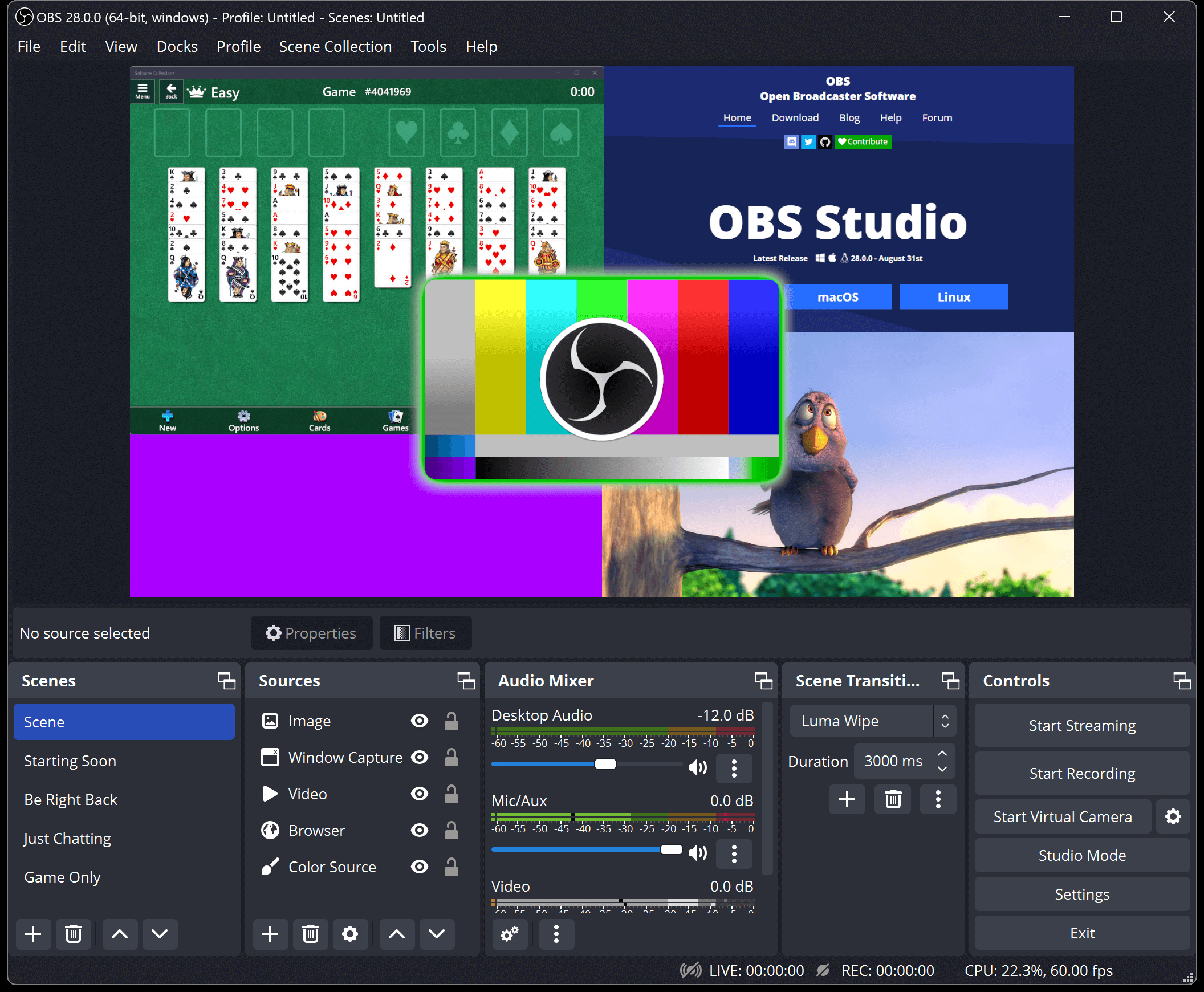
OBS Studio is a free and open source software for video recording and live streaming. Record everything from your monitor/screen/window or camera/capture card and live stream or save to your HDD as MP4/MKV. High performance real time video/audio capturing and mixing, with unlimited scenes you can switch between seamlessly via custom transitions. Filters for video sources such as image masking, color correction, chroma/color keying, and more.
Free software
OS:


File size: 150MB
Beta version
Portable version
Old versions
Version history
Alternative software
OS:
File size: 150MB
Beta version
Portable version
Old versions
Version history
Alternative software
Screenshots


Latest version

Download
Download OBS Studio 32.2.2 Windows 64-bit 152MB Win64
Download OBS Studio 32.2.2 Mac Silicon ARM 64-bit 179MB MacARM64
Download OBS Studio 32.2.2 Mac Intel 64-bit 190MB Mac64
Download OBS Studio 32.2.2 Linux 64-bit Linux64
Download Beta, Portable and other versions
Portable 
Download OBS Studio 32.2.2 Portable Windows ARM 64-bit 152MB WinARM64
Portable Download OBS Studio 33.0.0 Beta 6 Windows 64-bit 150MB Win64
Download OBS Studio 33.0.0 Beta 6 Portable Windows 64-bit 150MB Win64
Portable Download OBS Studio 33.0.0 Beta 6 Windows ARM 64-bit 152MB WinARM64
Download OBS Studio 33.0.0 Beta 6 Mac Silicon ARM 150MB MacARM64
Download OBS Studio 33.0.0 Beta 6 Mac 150MB Mac
Download old versions

Software License
Supported operating systems
Mac OS Linux Version history / Release notes / Changelog / What's New
OBS Studio 33.0.0 Beta 6
Beta 6 Changes
Fixed a crash during certain actions involving groups in Beta 1-5 [prgmitchell] (#13978)
Fixed scripting not working on macOS in Beta 1-5 [PatTheMav] (#13976)
Fixed game capture hooks not updating in Beta 1-5 [Warchamp7] (#13968)
Fixed clock Lua script not working in Beta 1-5 [RytoEX] (#13974)
Changed Safe Mode to not start WebSocket Server [FiniteSingularity/RytoEX] (#13984)
Removed support for FFmpeg 6.x and 7.x [RytoEX] (#13964)
Removed support for Qt 6.4-6.9 [RytoEX] (#13969)
OBS Studio 33.0.0-beta5
Beta 5 Changes
Fixed duplicate "Save Replay" hotkey entries when switching profiles [xtfo] (#13943)
Fixed warning dialogs on macOS not rendering rich text [Warchamp7] (#13949)
Fixed source icon state appearing inverted [Warchamp7] (#13953)
Fixed audio monitoring settings not saving [Warchamp7] (#13951)
Fixed missing encoder check showing missing encoders in an output mode that is not currently selected [Warchamp7] (#13950)
Fixed Windows updater not updating game capture and virtual camera in some cases [Warchamp7] (#13939)
OBS Studio 33.0.0-beta4
Beta 4 Changes
Fixed a CI and packaging issue. There are no application changes since Beta 1.
Beta 3 Changes
Fixed a CI issue. There are no application changes since Beta 1.
Beta 2 Changes
Fixed a versioning issue. There are no application changes since Beta 1.
33.0 New Features
Updated CEF from 127/6533 to 150/7871 [WizardCM] (#13900)
This is a massive update to the underlying framework used for browser sources and docks from the July 2024 release to September 2026
All of this work is on the backend and should be invisible to users. Please be sure to report any new weirdness or problems you run into with browser sources!
Complete overhaul to plugin loading [FiniteSingularity/PatTheMav] (#13594)
First-party plugins are now in a new folder named core
Third-party plugins have an updated installation location and folder structure
Existing third-party plugins will continue to load from the legacy locations until OBS Studio 34.0
More information is available in our knowledge base article.
Improved how source snapping works in the preview [Warchamp7] (#12298)
New visual indicator added
Sources now snap along the entire axis instead of only when directly touching
Sources no longer snap to hidden sources
Improved behavior of spinboxes for number values [Warchamp7] (#12337)
Typing is no longer mysteriously blocked in some situations
Numbers are no longer cut off in some situations
Values now update only after pressing Enter and Enter does not close the window
Holding Shift + Up/Down now advances multiple steps at a time
Dragging the cursor inside the input but outside the text itself now works properly
Enabled NVENC on Arm64 [RytoEX] (#13827)
33.0 Changes
Added a check for encoders being missing when loading a profile [derrod] (#11340)
Added support for newest NVIDIA Broadcast SDKs for NVIDIA Audio Effects and Video Effects [pkviet] (#13838)
Added hotkeys for controlling audio monitoring of a source [Warchamp7] (#13599)
Fixed issues with groups in Studio Mode [Warchamp7] (#11092)
Fixed moving sources inside a group causing them to glitch out in Program
Fixed moving sources inside a group showing up live in Program
Adjusted naming of Window Capture methods on Windows [Penwy] (#12047)
Improved detection of fullscreen games for Game Capture [Kira-NT] (#10880)
Improved transparency handling for macOS Screen Capture [jcm93] (#13030)
Scaled simple output recording audio bitrate by channel count [nickvonkaenel] (#13311)
Removed support for Ubuntu 24.04
33.0 Bug Fixes
Added a startup error if obs-transitions failed to load [notr1ch] (#13321)
Improved file splitting for Hybrid MP4/MOV [derrod] (#13386)
Fixed outputs getting stuck running when a bad rescale output resolution is set [suogesi] (#13375)
Fixed monitoring icon state getting desynced when using third-party tools or websockets [prgmitchell] (#13822)
Fixed potential crash when shader cache file is invalid [notr1ch] (#13538)
Fixed a potential crash on Linux when USB mic is removed [R0te/RytoEX] (#13922)
Fixed a potential crash when renaming a source with the Add Source window open [Warchamp7] (#13800)
Fixed a potential deadlock during video/audio tasks [exeldro] (#13579)
Fixed an issue with B-frame offset calculation in AMF that could cause streams to disconnect [lexano-ivs] (#13762)
Fixed PipeWire screencast sources being duplicated in studio mode [tytan652] (#13673)
Fixed a potential crash when switching off a newly created profile [Warchamp7] (#13182)
Fixed a source toolbar crash when source type is missing [Penwy] (#13539)
33.0 Developer Information
Added frontend event and output signal for replay buffer saving [Penwy] (#8955)
Added guidance regarding the theme system to the top of all theme files [Warchamp7] (#13733)
Added ability to set a file extension filter for OBS_PATH_FILE_SAVE path types [FiniteSingularity] (#10190)
Added obs_frontend_is_safe_mode for first-party plugins
Third-party plugins are not loaded at all in Safe Mode
Added versions to Flatpak plugin extension point [tytan652] (#13735)
Updated libnsgif to 1.0.0 [RytoEX] (#11178)
This is a breaking change for any plugins using libobs/graphics gs_image_file
Clarified documentation for obs_module_unload [notr1ch] (#13327)
Required MbedTLS 3 and exclude 4 or later [tytan652] (#13799)
Fixed repeated preview enable/disables not working [WarmUpTill] (#12580)
Only emit core signal handlers for public canvases [tt2468] (#13574)
Deprecated unused hidden API for sources [derrod] (#13122)
Deprecated APIs for audio source monitoring_type [Warchamp7] (#13599)
This is replaced by a new monitoring_enabled boolean
Beta 6 Changes
Fixed a crash during certain actions involving groups in Beta 1-5 [prgmitchell] (#13978)
Fixed scripting not working on macOS in Beta 1-5 [PatTheMav] (#13976)
Fixed game capture hooks not updating in Beta 1-5 [Warchamp7] (#13968)
Fixed clock Lua script not working in Beta 1-5 [RytoEX] (#13974)
Changed Safe Mode to not start WebSocket Server [FiniteSingularity/RytoEX] (#13984)
Removed support for FFmpeg 6.x and 7.x [RytoEX] (#13964)
Removed support for Qt 6.4-6.9 [RytoEX] (#13969)
OBS Studio 33.0.0-beta5
Beta 5 Changes
Fixed duplicate "Save Replay" hotkey entries when switching profiles [xtfo] (#13943)
Fixed warning dialogs on macOS not rendering rich text [Warchamp7] (#13949)
Fixed source icon state appearing inverted [Warchamp7] (#13953)
Fixed audio monitoring settings not saving [Warchamp7] (#13951)
Fixed missing encoder check showing missing encoders in an output mode that is not currently selected [Warchamp7] (#13950)
Fixed Windows updater not updating game capture and virtual camera in some cases [Warchamp7] (#13939)
OBS Studio 33.0.0-beta4
Beta 4 Changes
Fixed a CI and packaging issue. There are no application changes since Beta 1.
Beta 3 Changes
Fixed a CI issue. There are no application changes since Beta 1.
Beta 2 Changes
Fixed a versioning issue. There are no application changes since Beta 1.
33.0 New Features
Updated CEF from 127/6533 to 150/7871 [WizardCM] (#13900)
This is a massive update to the underlying framework used for browser sources and docks from the July 2024 release to September 2026
All of this work is on the backend and should be invisible to users. Please be sure to report any new weirdness or problems you run into with browser sources!
Complete overhaul to plugin loading [FiniteSingularity/PatTheMav] (#13594)
First-party plugins are now in a new folder named core
Third-party plugins have an updated installation location and folder structure
Existing third-party plugins will continue to load from the legacy locations until OBS Studio 34.0
More information is available in our knowledge base article.
Improved how source snapping works in the preview [Warchamp7] (#12298)
New visual indicator added
Sources now snap along the entire axis instead of only when directly touching
Sources no longer snap to hidden sources
Improved behavior of spinboxes for number values [Warchamp7] (#12337)
Typing is no longer mysteriously blocked in some situations
Numbers are no longer cut off in some situations
Values now update only after pressing Enter and Enter does not close the window
Holding Shift + Up/Down now advances multiple steps at a time
Dragging the cursor inside the input but outside the text itself now works properly
Enabled NVENC on Arm64 [RytoEX] (#13827)
33.0 Changes
Added a check for encoders being missing when loading a profile [derrod] (#11340)
Added support for newest NVIDIA Broadcast SDKs for NVIDIA Audio Effects and Video Effects [pkviet] (#13838)
Added hotkeys for controlling audio monitoring of a source [Warchamp7] (#13599)
Fixed issues with groups in Studio Mode [Warchamp7] (#11092)
Fixed moving sources inside a group causing them to glitch out in Program
Fixed moving sources inside a group showing up live in Program
Adjusted naming of Window Capture methods on Windows [Penwy] (#12047)
Improved detection of fullscreen games for Game Capture [Kira-NT] (#10880)
Improved transparency handling for macOS Screen Capture [jcm93] (#13030)
Scaled simple output recording audio bitrate by channel count [nickvonkaenel] (#13311)
Removed support for Ubuntu 24.04
33.0 Bug Fixes
Added a startup error if obs-transitions failed to load [notr1ch] (#13321)
Improved file splitting for Hybrid MP4/MOV [derrod] (#13386)
Fixed outputs getting stuck running when a bad rescale output resolution is set [suogesi] (#13375)
Fixed monitoring icon state getting desynced when using third-party tools or websockets [prgmitchell] (#13822)
Fixed potential crash when shader cache file is invalid [notr1ch] (#13538)
Fixed a potential crash on Linux when USB mic is removed [R0te/RytoEX] (#13922)
Fixed a potential crash when renaming a source with the Add Source window open [Warchamp7] (#13800)
Fixed a potential deadlock during video/audio tasks [exeldro] (#13579)
Fixed an issue with B-frame offset calculation in AMF that could cause streams to disconnect [lexano-ivs] (#13762)
Fixed PipeWire screencast sources being duplicated in studio mode [tytan652] (#13673)
Fixed a potential crash when switching off a newly created profile [Warchamp7] (#13182)
Fixed a source toolbar crash when source type is missing [Penwy] (#13539)
33.0 Developer Information
Added frontend event and output signal for replay buffer saving [Penwy] (#8955)
Added guidance regarding the theme system to the top of all theme files [Warchamp7] (#13733)
Added ability to set a file extension filter for OBS_PATH_FILE_SAVE path types [FiniteSingularity] (#10190)
Added obs_frontend_is_safe_mode for first-party plugins
Third-party plugins are not loaded at all in Safe Mode
Added versions to Flatpak plugin extension point [tytan652] (#13735)
Updated libnsgif to 1.0.0 [RytoEX] (#11178)
This is a breaking change for any plugins using libobs/graphics gs_image_file
Clarified documentation for obs_module_unload [notr1ch] (#13327)
Required MbedTLS 3 and exclude 4 or later [tytan652] (#13799)
Fixed repeated preview enable/disables not working [WarmUpTill] (#12580)
Only emit core signal handlers for public canvases [tt2468] (#13574)
Deprecated unused hidden API for sources [derrod] (#13122)
Deprecated APIs for audio source monitoring_type [Warchamp7] (#13599)
This is replaced by a new monitoring_enabled boolean
View full changelog
All features
Features
High performance real time video/audio capturing and mixing. Create scenes made up of multiple sources including window captures, images, text, browser windows, webcams, capture cards and more.
Set up an unlimited number of scenes you can switch between seamlessly via custom transitions.
Intuitive audio mixer with per-source filters such as noise gate, noise suppression, and gain. Take full control with VST plugin support.
Powerful and easy to use configuration options. Add new Sources, duplicate existing ones, and adjust their properties effortlessly.
Streamlined Settings panel gives you access to a wide array of configuration options to tweak every aspect of your broadcast or recording.
Modular 'Dock' UI allows you to rearrange the layout exactly as you like. You can even pop out each individual Dock to its own window.
OBS supports all your favorite streaming platforms and more.
Create Professional Productions
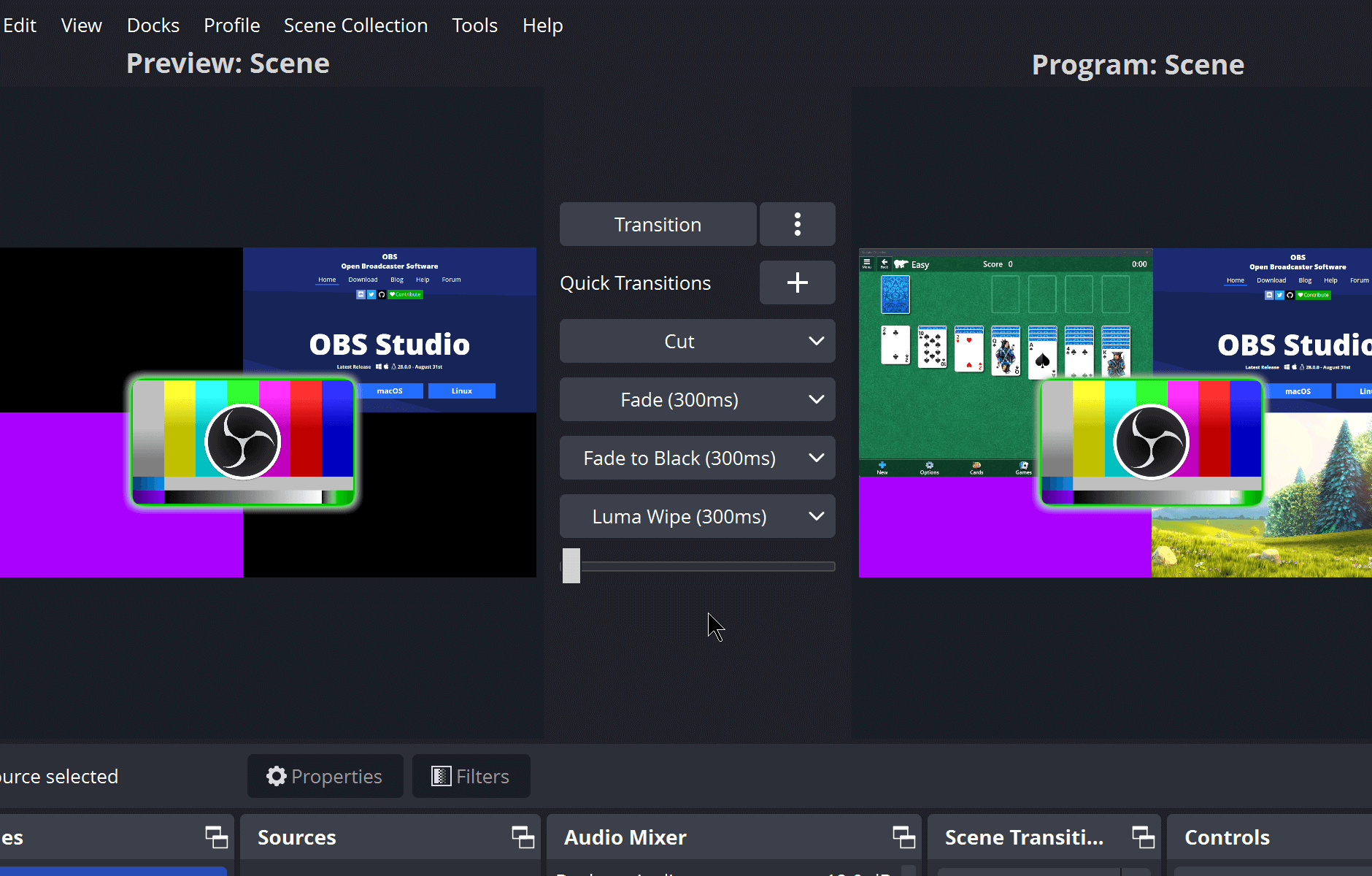
Choose from a number of different and customizable transitions for when you switch between your scenes or add your own stinger video files.
Set hotkeys for nearly every sort of action, such as switching between scenes, starting/stopping streams or recordings, muting audio sources, push to talk, and more.
Studio Mode lets you preview your scenes and sources before pushing them live. Adjust your scenes and sources or create new ones and ensure they're perfect before your viewers ever see them.
Get a high level view of your production using the Multiview. Monitor 8 different scenes and easily cue or transition to any of them with merely a single or double click.
High performance real time video/audio capturing and mixing. Create scenes made up of multiple sources including window captures, images, text, browser windows, webcams, capture cards and more.
Set up an unlimited number of scenes you can switch between seamlessly via custom transitions.
Intuitive audio mixer with per-source filters such as noise gate, noise suppression, and gain. Take full control with VST plugin support.
Powerful and easy to use configuration options. Add new Sources, duplicate existing ones, and adjust their properties effortlessly.
Streamlined Settings panel gives you access to a wide array of configuration options to tweak every aspect of your broadcast or recording.
Modular 'Dock' UI allows you to rearrange the layout exactly as you like. You can even pop out each individual Dock to its own window.
OBS supports all your favorite streaming platforms and more.
Create Professional Productions
Choose from a number of different and customizable transitions for when you switch between your scenes or add your own stinger video files.
Set hotkeys for nearly every sort of action, such as switching between scenes, starting/stopping streams or recordings, muting audio sources, push to talk, and more.
Studio Mode lets you preview your scenes and sources before pushing them live. Adjust your scenes and sources or create new ones and ensure they're perfect before your viewers ever see them.
Get a high level view of your production using the Multiview. Monitor 8 different scenes and easily cue or transition to any of them with merely a single or double click.
Sections/Browse similar tools
Linux Video Tools
MacOS Video Tools
Screen capture / Screen recording
Video Streaming
Video Streaming Downloaders
Alternative to OBS Studio
(Latest version updated)Bandicam (Sep 9, 2026)
ChrisPC Screen Recorder (Aug 10, 2026)
FFsplit (Dec 13, 2014)
Fraps (Feb 27, 2013)
IceCream Screen Recorder (Jun 5, 2026)
Streamlabs Desktop (Aug 13, 2026)
VokoscreenNG (Oct 2, 2026)
Guides and How to's
How to capture anything with Obs Studio
- ReadHow to record anything on your screen using the free OBS Studio
- ReadOBS Studio screen recording and streaming guides
- ReadOBS Studio video tutorials
View all guides with guide description here
Acronyms / Also Known As
Download OBS Studio Portable download from the Download links under Download and Download other versions!
Notify me when software updated or report software
| 25 reviews, Showing 1 to 5 reviews |
Latest version does not allow manual input of Output Resolution
Review by jdycus on
Jul 12, 2026 Version: 32.2.0 RC1
OS: Windows 10 64-bit Ease of use: 10/10
Functionality: 7/10
Value for money: 10/10
Overall: 8/10
Rating by pcspeak on
Mar 31, 2022 Version: 27.2.3
OS: Windows 10 64-bit Ease of use: 8/10
Functionality: 9/10
Value for money: 10/10
Overall: 9/10
Rating by kelly quinn on
Aug 18, 2021 Version: 10.33
OS: MacOS9 Ease of use: 10/10
Functionality: 10/10
Value for money: 10/10
Overall: 10/10
Rating by kelly quinn on
Aug 18, 2021 Version: 10.33
OS: MacOS9 Ease of use: 10/10
Functionality: 10/10
Value for money: 10/10
Overall: 10/10
Can not play any encrypted online video.
Review by linuxgeek on
Jul 13, 2021 Version: 27.0.1
OS: Windows 10 64-bit Ease of use: 5/10
Functionality: 5/10
Value for money: 10/10
Overall: 5/10
| 25 reviews, Showing 1 to 5 reviews |
| 1 tool hits, Showing 1 to 1 tools |
Explanation:
NEW SOFTWARE= New tool since your last visit
NEW VERSION= New version since your last visit
NEW REVIEW= New review since your last visit
NEW VERSION= New version
Latest version
Version number / Beta version number / Update version number and when it whas released.
Type and download
NO MORE UPDATES? = The software hasn't been updated in over 2 years.
NO LONGER DEVELOPED = The software hasn't been updated in over 5 years.
RECENTLY UPDATED = The software has been updated the last 31 days.
Freeware = Download Free software.
Freeware Trialware = Download Free software but some parts are trial/shareware.
Free software = Download Free software and also open source code also known as FOSS (Free and Open Source Software).
Free software Trialware = Download Free software and also open source code but some parts are trial/shareware.
Freeware Ads = Download Free software but supported by advertising, usually with a included browser toolbar. It may be disabled when installing or after installation.
Free software Ads = Free Download software and open source code but supported by advertising, usually with a included browser toolbar. It may be disabled when installing or after installation.
Trialware = Also called shareware or demo. Free Trial version available for download and testing with usually a time limit or limited functions.
Payware = No demo or trial available.
Portable version = A portable/standalone version is available. No installation is required.
v1.0.1 = Latest version available.
Download beta = It could be a Beta, RC(Release Candidate) or an Alpha / Nightly / Unstable version of the software.
Download 15MB = A direct link to the software download.
Win = Windows download version for 32-bit and 64-bit Windows.
Win64 = Windows 64-bit download version for 64-bit Windows.
WinARM64 = Windows 64-bit ARM download version for Windows ARM64/AArch64.
Mac = Mac download version for 64-bit Mac OS Intel/ARM64/AArch64.
MacARM64 = Mac Silicon download version for 64-bit Mac OS ARM64/AArch64.
Mac64 = Mac OS download version for 64-bit Intel Mac OS.
Linux = Linux download version.
Linux64 = Linux download version for 64bit Linux.
Linux ARM = Linux download version for Linux ARM64/AArch64.
Portable = Portable version. No installation is required.
Ad-Supported = The software is bundled with advertising. Be careful when you install the software and disable addons that you don't want!
Visit developers site = A link to the software developer site.
Download (mirror link) = A mirror link to the software download. It may not contain the latest versions.
Download old versions = Free downloads of previous versions of the program.
Download 64-bit version = If you have a 64bit operating system you can download this version.
Download portable version = Portable/Standalone version meaning that no installation is required, just extract the files to a folder and run directly.
Portable version available = Download the portable version and you can just extract the files and run the program without installation.
Old versions available = Download old versions of the program.
Version history available = Complete changelog on our site.
= Windows version available.
= Mac OS version available.
= Linux version available.
Our hosted software are virus and malware scanned with several antivirus programs using www.virustotal.com. (NOTE! Just one virustotal warning is 99.9% a false positive. And some software might receive 2-6 warnings but it's if they are not all same virus/trojan then it's 99% false positives.)
Rating
Rating from 0-10.
NEW SOFTWARE= New tool since your last visit
NEW VERSION= New version since your last visit
NEW REVIEW= New review since your last visit
NEW VERSION= New version
Latest version
Version number / Beta version number / Update version number and when it whas released.
Type and download
NO MORE UPDATES? = The software hasn't been updated in over 2 years.
NO LONGER DEVELOPED = The software hasn't been updated in over 5 years.
RECENTLY UPDATED = The software has been updated the last 31 days.
Freeware = Download Free software.
Freeware Trialware = Download Free software but some parts are trial/shareware.
Free software = Download Free software and also open source code also known as FOSS (Free and Open Source Software).
Free software Trialware = Download Free software and also open source code but some parts are trial/shareware.
Freeware Ads = Download Free software but supported by advertising, usually with a included browser toolbar. It may be disabled when installing or after installation.
Free software Ads = Free Download software and open source code but supported by advertising, usually with a included browser toolbar. It may be disabled when installing or after installation.
Trialware = Also called shareware or demo. Free Trial version available for download and testing with usually a time limit or limited functions.
Payware = No demo or trial available.
Portable version = A portable/standalone version is available. No installation is required.
v1.0.1 = Latest version available.
Download beta = It could be a Beta, RC(Release Candidate) or an Alpha / Nightly / Unstable version of the software.
Download 15MB = A direct link to the software download.
Win = Windows download version for 32-bit and 64-bit Windows.
Win64 = Windows 64-bit download version for 64-bit Windows.
WinARM64 = Windows 64-bit ARM download version for Windows ARM64/AArch64.
Mac = Mac download version for 64-bit Mac OS Intel/ARM64/AArch64.
MacARM64 = Mac Silicon download version for 64-bit Mac OS ARM64/AArch64.
Mac64 = Mac OS download version for 64-bit Intel Mac OS.
Linux = Linux download version.
Linux64 = Linux download version for 64bit Linux.
Linux ARM = Linux download version for Linux ARM64/AArch64.
Portable = Portable version. No installation is required.
Ad-Supported = The software is bundled with advertising. Be careful when you install the software and disable addons that you don't want!
Visit developers site = A link to the software developer site.
Download (mirror link) = A mirror link to the software download. It may not contain the latest versions.
Download old versions = Free downloads of previous versions of the program.
Download 64-bit version = If you have a 64bit operating system you can download this version.
Download portable version = Portable/Standalone version meaning that no installation is required, just extract the files to a folder and run directly.
Portable version available = Download the portable version and you can just extract the files and run the program without installation.
Old versions available = Download old versions of the program.
Version history available = Complete changelog on our site.
= Windows version available. = Mac OS version available. = Linux version available.Our hosted software are virus and malware scanned with several antivirus programs using www.virustotal.com. (NOTE! Just one virustotal warning is 99.9% a false positive. And some software might receive 2-6 warnings but it's if they are not all same virus/trojan then it's 99% false positives.)
Rating
Rating from 0-10.
Browse software by sections
All In One Blu-ray Converters (9)
All In One DVD Converters (12)
All In One MKV to MP4, Blu-ray, UHD (11)
All In One Video Converters (19)
Animation (3D, 2D Animation) (12)
Audio Editors (22)
Audio Encoders (80)
Audio Players (19)
Authoring (Blu-ray, UHD, AVCHD) (13)
Authoring (DivX) (4)
Authoring (DVD) (26)
Authoring (SVCD, VCD) (9)
Bitrate Calculators (7)
Blu-ray to AVI, MKV, MP4 (15)
Blu-ray to Blu-ray, AVCHD (10)
Burn (CD,DVD,Blu-ray) (24)
Camcorders, DV, HDV, AVCHD (31)
Capture TV, DVD, VCR (30)
CD, DVD, Blu-ray recovery (3)
Codec Packs (6)
All In One DVD Converters (12)
All In One MKV to MP4, Blu-ray, UHD (11)
All In One Video Converters (19)
Animation (3D, 2D Animation) (12)
Audio Editors (22)
Audio Encoders (80)
Audio Players (19)
Authoring (Blu-ray, UHD, AVCHD) (13)
Authoring (DivX) (4)
Authoring (DVD) (26)
Authoring (SVCD, VCD) (9)
Bitrate Calculators (7)
Blu-ray to AVI, MKV, MP4 (15)
Blu-ray to Blu-ray, AVCHD (10)
Burn (CD,DVD,Blu-ray) (24)
Camcorders, DV, HDV, AVCHD (31)
Capture TV, DVD, VCR (30)
CD, DVD, Blu-ray recovery (3)
Codec Packs (6)
Codec, Video Identifiers (31)
Codecs (67)
Decrypters (DVD Rippers) (16)
Decrypters (UHD, Blu-ray Rippers) (8)
DigitalTV, DVB, IPTV (40)
DVD to DVD (20)
DVD to MP4, MKV, H264, H265 (16)
DVD to VCD, SVCD (5)
DVD to XviD, AVI, DivX (16)
ISO, Image (14)
Linux Video Tools (216)
MacOS Video Tools (247)
Media (Blu-ray, DVD, CD) (9)
Media Center, HTPC (24)
Other Useful Tools (136)
Photo Blu-ray, DVD, SlideShow (8)
Portable (Mobile, PSP) (35)
Region Free Tools (5)
Screen capture , Screen recording (25)
Screenshots , Thumbnails (13)
Codecs (67)
Decrypters (DVD Rippers) (16)
Decrypters (UHD, Blu-ray Rippers) (8)
DigitalTV, DVB, IPTV (40)
DVD to DVD (20)
DVD to MP4, MKV, H264, H265 (16)
DVD to VCD, SVCD (5)
DVD to XviD, AVI, DivX (16)
ISO, Image (14)
Linux Video Tools (216)
MacOS Video Tools (247)
Media (Blu-ray, DVD, CD) (9)
Media Center, HTPC (24)
Other Useful Tools (136)
Photo Blu-ray, DVD, SlideShow (8)
Portable (Mobile, PSP) (35)
Region Free Tools (5)
Screen capture , Screen recording (25)
Screenshots , Thumbnails (13)
Subtitle Editors, Converters (72)
Tag Editors (4)
Video Compare Software (5)
Video Demultiplexers, Multiplexers (66)
Video Editors (Advanced, NLE) (35)
Video Editors (Basic) (57)
Video Editors (H264, MP4, MKV, MTS) (19)
Video Editors (Lossless) (5)
Video Editors (MPG, DVD) (16)
Video Editors (WMV, AVI) (15)
Video Encoders (AV1, VP8, VP9) (2)
Video Encoders (AVI, WMV) (38)
Video Encoders (H264, H265, MP4, MKV) (45)
Video Encoders (MPG, DVD) (23)
Video Encoders , Converters (156)
Video Frameservers (9)
Video Players (48)
Video Repair, Fix (24)
Video Scripting (10)
Video Streaming (20)
Tag Editors (4)
Video Compare Software (5)
Video Demultiplexers, Multiplexers (66)
Video Editors (Advanced, NLE) (35)
Video Editors (Basic) (57)
Video Editors (H264, MP4, MKV, MTS) (19)
Video Editors (Lossless) (5)
Video Editors (MPG, DVD) (16)
Video Editors (WMV, AVI) (15)
Video Encoders (AV1, VP8, VP9) (2)
Video Encoders (AVI, WMV) (38)
Video Encoders (H264, H265, MP4, MKV) (45)
Video Encoders (MPG, DVD) (23)
Video Encoders , Converters (156)
Video Frameservers (9)
Video Players (48)
Video Repair, Fix (24)
Video Scripting (10)
Video Streaming (20)