
Help us keep the list up to date and submit new video software here.
Try StreamFab Downloader and download streaming video from Netflix, Amazon, Youtube! Download free trial.
Tool
Description
Type
Rating
Reviews
PgcDemux demuxes a DVD/VOB,IFO (PGC) in its elementary streams, video(m2v), audio(ac3,wav,dts,mpa) and subtitles(sup).
Free software
OS:
File size: 151KB
Portable version
Other versions
Old versions
Version history
OS:
File size: 151KB
Portable version
Other versions
Old versions
Version history
Screenshots
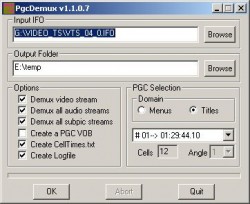
Latest version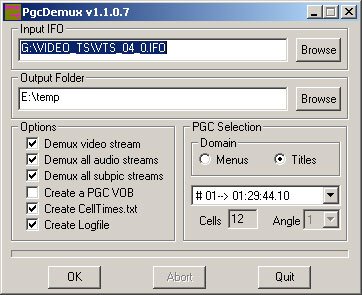
Download
Download PgcDemux 1.2.0.5 151KB Win Portable
Download Beta and other versions
Download old versions
Software License
Supported operating systems
Windows More information and other downloads
Download PgcDemux 1.2.0.5 m03 here. It's basically it's the same version of PgcDemux m2 but I have add 2 new options for the CLI mode. Now you can specify the first and the last cell for your demux for have only a part of your VOB.
Download PgcDemux 1.2.0.5 m02 here
Download PgcDemux 1.2.0.5 m02 here
Version history / Release notes / Changelog / What's New
Vers 1.2.0.5 m03 (24-04-2014) by NHE
Compiled under M$ C++ Visual Studio 2013.
- Added:Parameters: -sc, -ec
{-sc}. Define the first Cell (from n). Default 1
{-ec}. Define the last Cell (to n). Default the maximum cell available
- Update:Update de help message
http://www.videohelp.com/download/PgcDemux_1205Mod_m03_bin.zip
Vers 1.2.0.5 m02 (15-01-2011) by Pawel57
Compiled under M$ C++ Visual Studio Express 2008.
- Added:Blocked jumping out announcements in the Command Line mode
- Added:The check of the active process before the exit
- Changed:Rearranged exit codes:
1 = nothing was made
0 = finished without errors
-1= error appeared
Vers 1.2.0.5 m01 (03-05-2009) by Pawel57
- Added:Parameters: -guiwd, -guism, -help
{-guiwd, -nogui}. Opens GUI and waits for user dialog.
{-guism, -nogui}. Opens GUI, starts process and minimize window.
-help , /? or undefined. This help.
- Added:The jumping-out window of the help
- Changed: Internal help for parameters:
Command line usage:
PgcDemux [option1] [option2] ... [option15] <ifo_input_file> <destination_folder>
option1: [-pgc <pgcnumber>]. Selects the PGC number (from 1 to nPGCs). Default 1
option2: [-ang <angnumber>]. Selects the Angle number (from 1 to n). Default 1
option3: [-vid <vobid>]. Selects the Vob number (from 1 to n). Default 1
option4: [-cid <vobid> <cellid>]. Selects a cell vobid (from 1 to n). Default 1
option5: {-m2v, -nom2v}. Extracts/No extracts video file. Default NO
option6: {-aud, -noaud}. Extracts/No extracts audio streams. Default YES
option7: {-sub, -nosub}. Extracts/No extracts subs streams. Default YES
option8: {-vob, -novob}. Generates a single PGC VOB. Default NO
option9: [-customvob <flags>]. Generates a custom VOB file. Flags:
b: split VOB: one file per vob_id
n: write nav packs
v: write video packs
a: write audio packs
s: write subs packs
i: only first Iframe
l: patch LBA number
option10:{-cellt, -nocellt}. Generates a Celltimes.txt file. Default YES
option11:{-endt, -noendt}. Includes Last end time in Celltimes.txt. Default NO
option12:{-log, -nolog}. Generates a log file. Default YES
option13:{-menu, -title}. Domain. Default Title (except if filename is VIDEO_TS.IFO)
option14:{-guiwd, -nogui}. Opens GUI and waits for user dialog. Default NO
option15:{-guism, -nogui}. Opens GUI, starts process and minimise window. Default NO
option16:{-sc}. Define the first Cell (from n). Default 1
option17:{-ec}. Define the last Cell (to n). Default the maximum cell available
In default PgcDemux starts command line process without window (in the background).
-help , /? or undefined. This help.
Vers 1.2.0.5 (24-03-2014) by NHE
Compiled under M$ C++ Visual Studio 2013.
http://www.microsoft.com/en-us/download/details.aspx?id=40770 (Multibyte MFC Library for Visual Studio 2013)
Vers 1.2.0.5 (16-01-2009) by Pawel57
Compiled under M$ C++ Visual Studio Express 2005.
Thanks for Danny Ruijters
http://www.codeproject.com/KB/MFC/MFCinVisualStudioExpress.aspx
Changed only the information on the compilation in the file PgcDemux.rc
- My first public release
http://sourceforge.net/projects/streaman/files/Useful_Tools/PgcDemux_1205/
pawel57(at)users(dot)sourceforge(dot)net
Compiled under M$ C++ Visual Studio 2013.
- Added:Parameters: -sc, -ec
{-sc}. Define the first Cell (from n). Default 1
{-ec}. Define the last Cell (to n). Default the maximum cell available
- Update:Update de help message
http://www.videohelp.com/download/PgcDemux_1205Mod_m03_bin.zip
Vers 1.2.0.5 m02 (15-01-2011) by Pawel57
Compiled under M$ C++ Visual Studio Express 2008.
- Added:Blocked jumping out announcements in the Command Line mode
- Added:The check of the active process before the exit
- Changed:Rearranged exit codes:
1 = nothing was made
0 = finished without errors
-1= error appeared
Vers 1.2.0.5 m01 (03-05-2009) by Pawel57
- Added:Parameters: -guiwd, -guism, -help
{-guiwd, -nogui}. Opens GUI and waits for user dialog.
{-guism, -nogui}. Opens GUI, starts process and minimize window.
-help , /? or undefined. This help.
- Added:The jumping-out window of the help
- Changed: Internal help for parameters:
Command line usage:
PgcDemux [option1] [option2] ... [option15] <ifo_input_file> <destination_folder>
option1: [-pgc <pgcnumber>]. Selects the PGC number (from 1 to nPGCs). Default 1
option2: [-ang <angnumber>]. Selects the Angle number (from 1 to n). Default 1
option3: [-vid <vobid>]. Selects the Vob number (from 1 to n). Default 1
option4: [-cid <vobid> <cellid>]. Selects a cell vobid (from 1 to n). Default 1
option5: {-m2v, -nom2v}. Extracts/No extracts video file. Default NO
option6: {-aud, -noaud}. Extracts/No extracts audio streams. Default YES
option7: {-sub, -nosub}. Extracts/No extracts subs streams. Default YES
option8: {-vob, -novob}. Generates a single PGC VOB. Default NO
option9: [-customvob <flags>]. Generates a custom VOB file. Flags:
b: split VOB: one file per vob_id
n: write nav packs
v: write video packs
a: write audio packs
s: write subs packs
i: only first Iframe
l: patch LBA number
option10:{-cellt, -nocellt}. Generates a Celltimes.txt file. Default YES
option11:{-endt, -noendt}. Includes Last end time in Celltimes.txt. Default NO
option12:{-log, -nolog}. Generates a log file. Default YES
option13:{-menu, -title}. Domain. Default Title (except if filename is VIDEO_TS.IFO)
option14:{-guiwd, -nogui}. Opens GUI and waits for user dialog. Default NO
option15:{-guism, -nogui}. Opens GUI, starts process and minimise window. Default NO
option16:{-sc}. Define the first Cell (from n). Default 1
option17:{-ec}. Define the last Cell (to n). Default the maximum cell available
In default PgcDemux starts command line process without window (in the background).
-help , /? or undefined. This help.
Vers 1.2.0.5 (24-03-2014) by NHE
Compiled under M$ C++ Visual Studio 2013.
http://www.microsoft.com/en-us/download/details.aspx?id=40770 (Multibyte MFC Library for Visual Studio 2013)
Vers 1.2.0.5 (16-01-2009) by Pawel57
Compiled under M$ C++ Visual Studio Express 2005.
Thanks for Danny Ruijters
http://www.codeproject.com/KB/MFC/MFCinVisualStudioExpress.aspx
Changed only the information on the compilation in the file PgcDemux.rc
- My first public release
http://sourceforge.net/projects/streaman/files/Useful_Tools/PgcDemux_1205/
pawel57(at)users(dot)sourceforge(dot)net
View full changelog
Sections/Browse similar tools
Guides and How to's
How to add new subtitles to an existing DVD
- ReadHow to fix audio out of sync in a DVD without any reconverting
- ReadSimplistic Guide for Replacing DVD Streams (flash)
- ReadPgcDemux video tutorials
View all guides with guide description here
Notify me when software updated or report software
| 8 reviews, Showing 1 to 5 reviews |
Rating by B. Barrera on
Mar 30, 2019 Version: 1.2.0.5
OS: Windows 10 64-bit Ease of use: 8/10
Functionality: 9/10
Value for money: 10/10
Overall: 10/10
It would be excellent if it could split PGC audio, one file per chapter.
It would be a great simple concert audio extraction tool instead of having to use DVDDecrypter.
It’s the only shortcoming that makes I don’t use it as often as I would have liked. :)
It would be a great simple concert audio extraction tool instead of having to use DVDDecrypter.
It’s the only shortcoming that makes I don’t use it as often as I would have liked. :)
Review by jesus2099 on
Jul 29, 2015 Version: 1.2.0.5
OS: WinXP Ease of use: 7/10
Functionality: 7/10
Value for money: 8/10
Overall: 8/10
Thanks to the author from me as well, PgcDemux has served me well over the years - and continues to do so.
Review by Greathelp on
Mar 13, 2013 Version: 1.2.0.5
OS: Windows 8 64-bit Ease of use: 9/10
Functionality: 10/10
Value for money: 10/10
Overall: 10/10
Excellent tool, very useful to me (once or twice, vital).
Just a few things to think about for future relases, minor one first, biggie second:
1. Try to reduce navigation between sessions. Best to save paths upon exist and restore them on launch. Most important would be the destination path.
2. The ability to mass-demux individual cells into individual files/file sets would be of enormous value to me, since many of my projects involved large numbers of tiny clips.
Good work!
Just a few things to think about for future relases, minor one first, biggie second:
1. Try to reduce navigation between sessions. Best to save paths upon exist and restore them on launch. Most important would be the destination path.
2. The ability to mass-demux individual cells into individual files/file sets would be of enormous value to me, since many of my projects involved large numbers of tiny clips.
Good work!
Review by rhsimard on
Apr 1, 2008 Version: 1.2.0.5
OS: WinXP Ease of use: 6/10
Functionality: 10/10
Value for money: 10/10
Overall: 8/10
This is a nice little tool, I have always wondered how to demux an audio stream from an already authored dvd,to replace with another. Well PgcDemux, does the job very wel. Demuxing the video and/or audio into seperate streams. Used with programs like Muxman and Voblanker, Pgcdemux works wonders for my post authoring jobs. Very fast,and very reliable!
Review by Hittz on
May 22, 2007 Version: 1.2.0.5
OS: WinXP Ease of use: 8/10
Functionality: 9/10
Value for money: 10/10
Overall: 9/10
| 8 reviews, Showing 1 to 5 reviews |
| 1 tool hits, Showing 1 to 1 tools |
Explanation:
NEW SOFTWARE= New tool since your last visit
NEW VERSION= New version since your last visit
NEW REVIEW= New review since your last visit
NEW VERSION= New version
Latest version
Version number / Beta version number / Update version number and when it whas released.
Type and download
NO MORE UPDATES? = The software hasn't been updated in over 2 years.
NO LONGER DEVELOPED = The software hasn't been updated in over 5 years.
RECENTLY UPDATED = The software has been updated the last 31 days.
Freeware = Download Free software.
Freeware Trialware = Download Free software but some parts are trial/shareware.
Free software = Download Free software and also open source code also known as FOSS (Free and Open Source Software).
Free software Trialware = Download Free software and also open source code but some parts are trial/shareware.
Freeware Ads = Download Free software but supported by advertising, usually with a included browser toolbar. It may be disabled when installing or after installation.
Free software Ads = Free Download software and open source code but supported by advertising, usually with a included browser toolbar. It may be disabled when installing or after installation.
Trialware = Also called shareware or demo. Free Trial version available for download and testing with usually a time limit or limited functions.
Payware = No demo or trial available.
Portable version = A portable/standalone version is available. No installation is required.
v1.0.1 = Latest version available.
Download beta = It could be a Beta, RC(Release Candidate) or an Alpha / Nightly / Unstable version of the software.
Download 15MB = A direct link to the software download.
Win = Windows download version. It works on 32-bit and 64-bit Windows.
Win64 = Windows 64-bit download version. It works only on 64-bit Windows.
Mac = Mac download version. It works on 32-bit and 64-bit Mac OS.
Mac64 = Mac OS download version. It works only on 64-bit Mac OS.
Linux = Linux download version.
Portable = Portable version. No installation is required.
Ad-Supported = The software is bundled with advertising. Be careful when you install the software and disable addons that you don't want!
Visit developers site = A link to the software developer site.
Download (mirror link) = A mirror link to the software download. It may not contain the latest versions.
Download old versions = Free downloads of previous versions of the program.
Download 64-bit version = If you have a 64bit operating system you can download this version.
Download portable version = Portable/Standalone version meaning that no installation is required, just extract the files to a folder and run directly.
Portable version available = Download the portable version and you can just extract the files and run the program without installation.
Old versions available = Download old versions of the program.
Version history available = Complete changelog on our site.
= Windows version available.
 = Mac OS version available.
 = Linux version available.
Our hosted software are virus and malware scanned with several antivirus programs using www.virustotal.com. (NOTE! Just one virustotal warning is 99.9% a false positive. And some software might receive 2-6 warnings but it's if they are not all same virus/trojan then it's 99% false positives.)
Rating
Rating from 0-10.
NEW SOFTWARE= New tool since your last visit
NEW VERSION= New version since your last visit
NEW REVIEW= New review since your last visit
NEW VERSION= New version
Latest version
Version number / Beta version number / Update version number and when it whas released.
Type and download
NO MORE UPDATES? = The software hasn't been updated in over 2 years.
NO LONGER DEVELOPED = The software hasn't been updated in over 5 years.
RECENTLY UPDATED = The software has been updated the last 31 days.
Freeware = Download Free software.
Freeware Trialware = Download Free software but some parts are trial/shareware.
Free software = Download Free software and also open source code also known as FOSS (Free and Open Source Software).
Free software Trialware = Download Free software and also open source code but some parts are trial/shareware.
Freeware Ads = Download Free software but supported by advertising, usually with a included browser toolbar. It may be disabled when installing or after installation.
Free software Ads = Free Download software and open source code but supported by advertising, usually with a included browser toolbar. It may be disabled when installing or after installation.
Trialware = Also called shareware or demo. Free Trial version available for download and testing with usually a time limit or limited functions.
Payware = No demo or trial available.
Portable version = A portable/standalone version is available. No installation is required.
v1.0.1 = Latest version available.
Download beta = It could be a Beta, RC(Release Candidate) or an Alpha / Nightly / Unstable version of the software.
Download 15MB = A direct link to the software download.
Win = Windows download version. It works on 32-bit and 64-bit Windows.
Win64 = Windows 64-bit download version. It works only on 64-bit Windows.
Mac = Mac download version. It works on 32-bit and 64-bit Mac OS.
Mac64 = Mac OS download version. It works only on 64-bit Mac OS.
Linux = Linux download version.
Portable = Portable version. No installation is required.
Ad-Supported = The software is bundled with advertising. Be careful when you install the software and disable addons that you don't want!
Visit developers site = A link to the software developer site.
Download (mirror link) = A mirror link to the software download. It may not contain the latest versions.
Download old versions = Free downloads of previous versions of the program.
Download 64-bit version = If you have a 64bit operating system you can download this version.
Download portable version = Portable/Standalone version meaning that no installation is required, just extract the files to a folder and run directly.
Portable version available = Download the portable version and you can just extract the files and run the program without installation.
Old versions available = Download old versions of the program.
Version history available = Complete changelog on our site.
= Windows version available. = Mac OS version available. = Linux version available.Our hosted software are virus and malware scanned with several antivirus programs using www.virustotal.com. (NOTE! Just one virustotal warning is 99.9% a false positive. And some software might receive 2-6 warnings but it's if they are not all same virus/trojan then it's 99% false positives.)
Rating
Rating from 0-10.
Browse software by sections
All In One Blu-ray Converters (10)
All In One DVD Converters (13)
All In One MKV to MP4, Blu-ray, UHD (11)
All In One Video Converters (19)
Animation (3D, 2D Animation) (11)
Audio Editors (21)
Audio Encoders (82)
Audio Players (19)
Authoring (Blu-ray, UHD, AVCHD) (15)
Authoring (DivX) (4)
Authoring (DVD) (26)
Authoring (SVCD, VCD) (9)
Bitrate Calculators (7)
Blu-ray to AVI, MKV, MP4 (15)
Blu-ray to Blu-ray, AVCHD (10)
Burn (CD,DVD,Blu-ray) (24)
Camcorders, DV, HDV, AVCHD (31)
Capture TV, DVD, VCR (31)
CD, DVD, Blu-ray recovery (3)
Codec Packs (6)
All In One DVD Converters (13)
All In One MKV to MP4, Blu-ray, UHD (11)
All In One Video Converters (19)
Animation (3D, 2D Animation) (11)
Audio Editors (21)
Audio Encoders (82)
Audio Players (19)
Authoring (Blu-ray, UHD, AVCHD) (15)
Authoring (DivX) (4)
Authoring (DVD) (26)
Authoring (SVCD, VCD) (9)
Bitrate Calculators (7)
Blu-ray to AVI, MKV, MP4 (15)
Blu-ray to Blu-ray, AVCHD (10)
Burn (CD,DVD,Blu-ray) (24)
Camcorders, DV, HDV, AVCHD (31)
Capture TV, DVD, VCR (31)
CD, DVD, Blu-ray recovery (3)
Codec Packs (6)
Codec, Video Identifiers (29)
Codecs (67)
Decrypters (DVD Rippers) (15)
Decrypters (UHD, Blu-ray Rippers) (8)
DigitalTV, DVB, IPTV (38)
DVD to DVD (20)
DVD to MP4, MKV, H264, H265 (16)
DVD to VCD, SVCD (5)
DVD to XviD, AVI, DivX (16)
ISO, Image (16)
Linux Video Tools (182)
MacOS Video Tools (224)
Media (Blu-ray, DVD, CD) (9)
Media Center, HTPC (37)
Other Useful Tools (135)
Photo Blu-ray, DVD, SlideShow (8)
Portable (Mobile, PSP) (35)
Region Free Tools (5)
Screen capture , Screen recording (27)
Screenshots , Thumbnails (13)
Codecs (67)
Decrypters (DVD Rippers) (15)
Decrypters (UHD, Blu-ray Rippers) (8)
DigitalTV, DVB, IPTV (38)
DVD to DVD (20)
DVD to MP4, MKV, H264, H265 (16)
DVD to VCD, SVCD (5)
DVD to XviD, AVI, DivX (16)
ISO, Image (16)
Linux Video Tools (182)
MacOS Video Tools (224)
Media (Blu-ray, DVD, CD) (9)
Media Center, HTPC (37)
Other Useful Tools (135)
Photo Blu-ray, DVD, SlideShow (8)
Portable (Mobile, PSP) (35)
Region Free Tools (5)
Screen capture , Screen recording (27)
Screenshots , Thumbnails (13)
Subtitle Editors, Converters (70)
Tag Editors (3)
Video De, Multiplexers (64)
Video Editors (Advanced, NLE) (33)
Video Editors (Basic) (52)
Video Editors (H264, MP4, MKV, MTS) (19)
Video Editors (MPG, DVD) (16)
Video Editors (WMV, AVI) (16)
Video Encoders (AV1, VP8, VP9) (2)
Video Encoders (AVI, WMV) (39)
Video Encoders (H264, H265, MP4, MKV) (45)
Video Encoders (MPG, DVD) (23)
Video Encoders , Converters (154)
Video Frameservers (9)
Video Players (46)
Video Repair, Fix (25)
Video Scripting (11)
Video Streaming (21)
Video Streaming Downloaders (110)
Virtualdub Tools (11)
Tag Editors (3)
Video De, Multiplexers (64)
Video Editors (Advanced, NLE) (33)
Video Editors (Basic) (52)
Video Editors (H264, MP4, MKV, MTS) (19)
Video Editors (MPG, DVD) (16)
Video Editors (WMV, AVI) (16)
Video Encoders (AV1, VP8, VP9) (2)
Video Encoders (AVI, WMV) (39)
Video Encoders (H264, H265, MP4, MKV) (45)
Video Encoders (MPG, DVD) (23)
Video Encoders , Converters (154)
Video Frameservers (9)
Video Players (46)
Video Repair, Fix (25)
Video Scripting (11)
Video Streaming (21)
Video Streaming Downloaders (110)
Virtualdub Tools (11)