
Help us keep the list up to date and submit new video software here.
Try DVDFab and copy all Ultra HD Blu-rays and DVDs / remove Cinavia protection! Download free trial.
Tool
Description
Type
Rating
Reviews
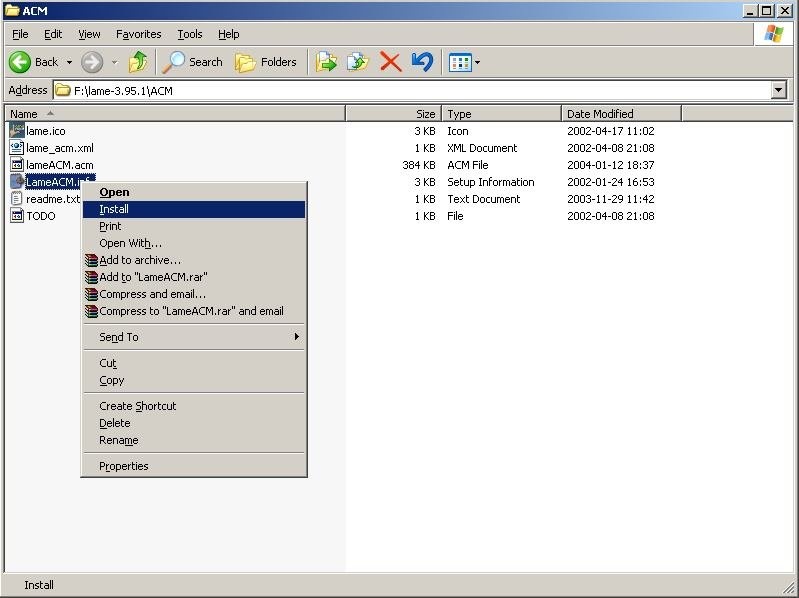
LAME is a MP3 encoder and the Lame ACM MP3 is an ACM codec that you can use in most applications for example in Virtualdub(to install the ACM codec just extract all files and right click on the LameACM.inf and select Install). LameDropXPd is a practical frontend for LAME that makes things easier to the user, as there is no need to know about command line usage: most LAME settings are reachable on a graphical interface.
Free software
OS:
File size: 1MB
Other versions
Old versions
Version history
OS:
File size: 1MB
Other versions
Old versions
Version history
Screenshots

Latest version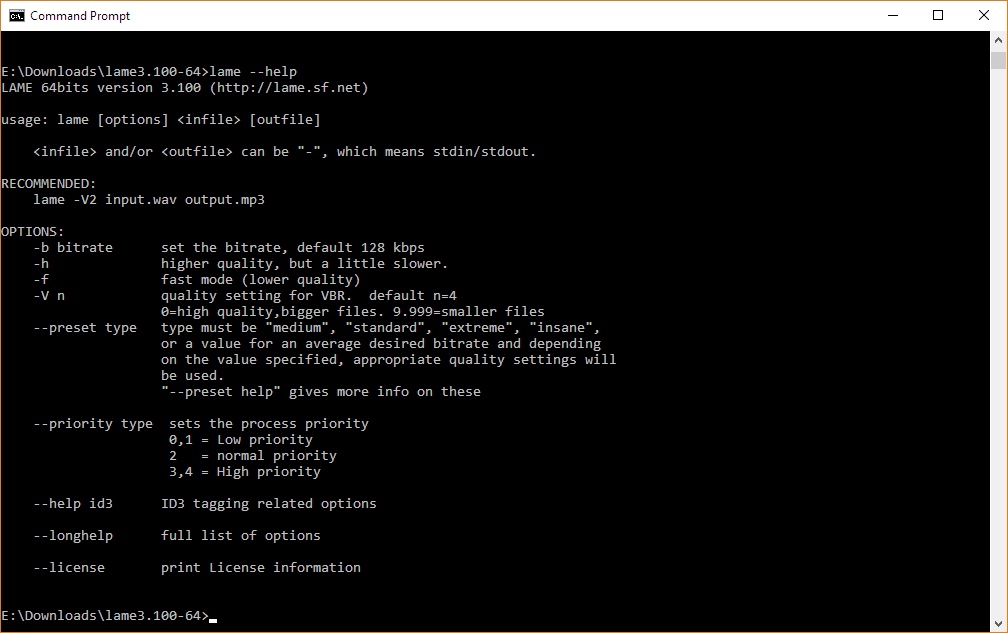
Download
Download LAME MP3 3.100.1 64-bit 1MB Win64
Download LAME MP3 3.100.1 1MB Win
Download Beta and other versions
Download old versions
Software License
Supported operating systems
Windows More information and other downloads
Download LameDropXPd here, a very simple GUI/Frontend for Lame
Download LameXP here, a GUI for Lame
Download winLame here, another GUI for Lame
Download LameFE here, yet another gui for Lame(no longer updated)
Download LameXP here, a GUI for Lame
Download winLame here, another GUI for Lame
Download LameFE here, yet another gui for Lame(no longer updated)
Version history / Release notes / Changelog / What's New
LAME 3.100.1
2020-09-08
Bundle compiled with Intel 19 Compiler. win32 compile should work on XP, or later. This a point release with NO changes to the encoding library. The internal mpglib decoding library has been replaced with the libmpg123 decoding library.
LAME 3.100.1 under construction
Robert Hegemann
Patch submitted by KO Myung-Hun, patch ticket [ #80 ] OS/2 patches
Patch submitted by Elio Blanca, patch ticket [ #82 ] Take advantage of terminal width on printing file names
Bug fix for item [ #496 ] A critical bug in init_xrpow_core_sse
Bug fix for item [ #500 ] Buffer overflow in encoder
Bug fix for item [ #501 ] Encoder: Assertion 'eov->bitrate_index <= cfg->vbr_max_bitrate_index' failed during ABR encoding
Bug fix for item [ #444 ] msacmdrv.h (structure packing alignment)
Alexander Leidinger
Add faster CRC routine. The speed improvement is very small for typical use cases, but may be valuable if a lot of independent encodes are running and/or for a very long time. Patch by Robert Kausch of the fre:ac project.
Fix configure script glob-ranges matching of compiler versions. This may result in faster code if no compiler optimization flags are specified during the configure step. This is part of patch ticket [ #491 ] lame 3.100 slower than 3.99.5
Disable Takehiros IEEE753 hack by default. On modern CPUs (anything more recent from AMD than hammer/k8; Intel: Core2, i3/5/7/9 and similar -- no idea about recent Atom/Pentium) it is a speed pessimization. Add a configure option for it so that it can be enabled on old CPUs.
Update to more recent autotools based scripts, this may or may not fix issues during the configure stage for less popular or more recent OS or architectures.
2020-09-08
Bundle compiled with Intel 19 Compiler. win32 compile should work on XP, or later. This a point release with NO changes to the encoding library. The internal mpglib decoding library has been replaced with the libmpg123 decoding library.
LAME 3.100.1 under construction
Robert Hegemann
Patch submitted by KO Myung-Hun, patch ticket [ #80 ] OS/2 patches
Patch submitted by Elio Blanca, patch ticket [ #82 ] Take advantage of terminal width on printing file names
Bug fix for item [ #496 ] A critical bug in init_xrpow_core_sse
Bug fix for item [ #500 ] Buffer overflow in encoder
Bug fix for item [ #501 ] Encoder: Assertion 'eov->bitrate_index <= cfg->vbr_max_bitrate_index' failed during ABR encoding
Bug fix for item [ #444 ] msacmdrv.h (structure packing alignment)
Alexander Leidinger
Add faster CRC routine. The speed improvement is very small for typical use cases, but may be valuable if a lot of independent encodes are running and/or for a very long time. Patch by Robert Kausch of the fre:ac project.
Fix configure script glob-ranges matching of compiler versions. This may result in faster code if no compiler optimization flags are specified during the configure step. This is part of patch ticket [ #491 ] lame 3.100 slower than 3.99.5
Disable Takehiros IEEE753 hack by default. On modern CPUs (anything more recent from AMD than hammer/k8; Intel: Core2, i3/5/7/9 and similar -- no idea about recent Atom/Pentium) it is a speed pessimization. Add a configure option for it so that it can be enabled on old CPUs.
Update to more recent autotools based scripts, this may or may not fix issues during the configure stage for less popular or more recent OS or architectures.
View full changelog
Sections/Browse similar tools
Alternative to LAME MP3
foobar2000
LameXP
Pazera Lame Front-End
winLAME
Guides and How to's
Acronyms / Also Known As
Notify me when software updated or report software
| 36 reviews, Showing 1 to 5 reviews |
It's the SoX resampling 'best' option which is causing LamedropXPd GUI to not initiate. Just use medium setting- it's fine!
Review by David on
Jun 25, 2021 Version: 3.100
OS: Windows 10 64-bit Ease of use: 8/10
Functionality: 8/10
Value for money: 10/10
Overall: 10/10
Would Baldrick please pass on to lamedropXPd creator John Edwards at Rarewares this info regarding resampling bug please. The bug is only using the 'best option' as the other two options 'fast' and 'medium' work fine as intended. The older Lamedropbox from 2017 has the same bug. I tested 32 bit dropbox bitin WinXP and Win7 32 bit systems. Thankyou.
Review by Rod on
Jun 25, 2021 Version: 3.100.1
OS: WinXP Ease of use: 8/10
Functionality: 9/10
Value for money: 10/10
Overall: 10/10
I reverted back to older 3.100 LameDropXpd which has working resampling option as newer 2021 version has removed this useful option due to a bug introduced during recompiling? of code. My own preference is to still use Lame 3.98.4 for general use, but one below is excellent too.
Review is for this last 3.100 working version from link below:
https://codecpack.co/download/LamedropXPd.html
Review is for this last 3.100 working version from link below:
https://codecpack.co/download/LamedropXPd.html
Review by Kit on
Jun 23, 2021 Version: 3.100.1
OS: Windows 7 64-bit Ease of use: 10/10
Functionality: 9/10
Value for money: 10/10
Overall: 9/10
Still useful and relevant. You need a Dropbox or GUI for this hence my low review on ease of use. By the way the latest Rarewares Lame Dropbox has a resampling bug so that option has been removed until it's fixed. I reverted to the last Dropbox box which is bug free.
Review by Tim on
Jun 6, 2021 Version: 3.100.1
OS: Windows 7 64-bit Ease of use: 2/10
Functionality: 9/10
Value for money: 9/10
Overall: 9/10
There is a God and it's over at Rarewares which has updated the Lame Dropbox to latest Lame build. Thankyou for this excellent tool.
Review by Kevin on
May 11, 2021 Version: 3.100.1
OS: Windows 10 64-bit Ease of use: 10/10
Functionality: 10/10
Value for money: 10/10
Overall: 10/10
| 36 reviews, Showing 1 to 5 reviews |
| 1 tool hits, Showing 1 to 1 tools |
Explanation:
NEW SOFTWARE= New tool since your last visit
NEW VERSION= New version since your last visit
NEW REVIEW= New review since your last visit
NEW VERSION= New version
Latest version
Version number / Beta version number / Update version number and when it whas released.
Type and download
NO MORE UPDATES? = The software hasn't been updated in over 2 years.
NO LONGER DEVELOPED = The software hasn't been updated in over 5 years.
RECENTLY UPDATED = The software has been updated the last 31 days.
Freeware = Download Free software.
Freeware Trialware = Download Free software but some parts are trial/shareware.
Free software = Download Free software and also open source code also known as FOSS (Free and Open Source Software).
Free software Trialware = Download Free software and also open source code but some parts are trial/shareware.
Freeware Ads = Download Free software but supported by advertising, usually with a included browser toolbar. It may be disabled when installing or after installation.
Free software Ads = Free Download software and open source code but supported by advertising, usually with a included browser toolbar. It may be disabled when installing or after installation.
Trialware = Also called shareware or demo. Free Trial version available for download and testing with usually a time limit or limited functions.
Payware = No demo or trial available.
Portable version = A portable/standalone version is available. No installation is required.
v1.0.1 = Latest version available.
Download beta = It could be a Beta, RC(Release Candidate) or an Alpha / Nightly / Unstable version of the software.
Download 15MB = A direct link to the software download.
Win = Windows download version. It works on 32-bit and 64-bit Windows.
Win64 = Windows 64-bit download version. It works only on 64-bit Windows.
Mac = Mac download version. It works on 32-bit and 64-bit Mac OS.
Mac64 = Mac OS download version. It works only on 64-bit Mac OS.
Linux = Linux download version.
Portable = Portable version. No installation is required.
Ad-Supported = The software is bundled with advertising. Be careful when you install the software and disable addons that you don't want!
Visit developers site = A link to the software developer site.
Download (mirror link) = A mirror link to the software download. It may not contain the latest versions.
Download old versions = Free downloads of previous versions of the program.
Download 64-bit version = If you have a 64bit operating system you can download this version.
Download portable version = Portable/Standalone version meaning that no installation is required, just extract the files to a folder and run directly.
Portable version available = Download the portable version and you can just extract the files and run the program without installation.
Old versions available = Download old versions of the program.
Version history available = Complete changelog on our site.
= Windows version available.
 = Mac OS version available.
 = Linux version available.
Our hosted software are virus and malware scanned with several antivirus programs using www.virustotal.com. (NOTE! Just one virustotal warning is 99.9% a false positive. And some software might receive 2-6 warnings but it's if they are not all same virus/trojan then it's 99% false positives.)
Rating
Rating from 0-10.
NEW SOFTWARE= New tool since your last visit
NEW VERSION= New version since your last visit
NEW REVIEW= New review since your last visit
NEW VERSION= New version
Latest version
Version number / Beta version number / Update version number and when it whas released.
Type and download
NO MORE UPDATES? = The software hasn't been updated in over 2 years.
NO LONGER DEVELOPED = The software hasn't been updated in over 5 years.
RECENTLY UPDATED = The software has been updated the last 31 days.
Freeware = Download Free software.
Freeware Trialware = Download Free software but some parts are trial/shareware.
Free software = Download Free software and also open source code also known as FOSS (Free and Open Source Software).
Free software Trialware = Download Free software and also open source code but some parts are trial/shareware.
Freeware Ads = Download Free software but supported by advertising, usually with a included browser toolbar. It may be disabled when installing or after installation.
Free software Ads = Free Download software and open source code but supported by advertising, usually with a included browser toolbar. It may be disabled when installing or after installation.
Trialware = Also called shareware or demo. Free Trial version available for download and testing with usually a time limit or limited functions.
Payware = No demo or trial available.
Portable version = A portable/standalone version is available. No installation is required.
v1.0.1 = Latest version available.
Download beta = It could be a Beta, RC(Release Candidate) or an Alpha / Nightly / Unstable version of the software.
Download 15MB = A direct link to the software download.
Win = Windows download version. It works on 32-bit and 64-bit Windows.
Win64 = Windows 64-bit download version. It works only on 64-bit Windows.
Mac = Mac download version. It works on 32-bit and 64-bit Mac OS.
Mac64 = Mac OS download version. It works only on 64-bit Mac OS.
Linux = Linux download version.
Portable = Portable version. No installation is required.
Ad-Supported = The software is bundled with advertising. Be careful when you install the software and disable addons that you don't want!
Visit developers site = A link to the software developer site.
Download (mirror link) = A mirror link to the software download. It may not contain the latest versions.
Download old versions = Free downloads of previous versions of the program.
Download 64-bit version = If you have a 64bit operating system you can download this version.
Download portable version = Portable/Standalone version meaning that no installation is required, just extract the files to a folder and run directly.
Portable version available = Download the portable version and you can just extract the files and run the program without installation.
Old versions available = Download old versions of the program.
Version history available = Complete changelog on our site.
= Windows version available. = Mac OS version available. = Linux version available.Our hosted software are virus and malware scanned with several antivirus programs using www.virustotal.com. (NOTE! Just one virustotal warning is 99.9% a false positive. And some software might receive 2-6 warnings but it's if they are not all same virus/trojan then it's 99% false positives.)
Rating
Rating from 0-10.
Browse software by sections
All In One Blu-ray Converters (10)
All In One DVD Converters (13)
All In One MKV to MP4, Blu-ray, UHD (11)
All In One Video Converters (19)
Animation (3D, 2D Animation) (11)
Audio Editors (21)
Audio Encoders (82)
Audio Players (19)
Authoring (Blu-ray, UHD, AVCHD) (15)
Authoring (DivX) (4)
Authoring (DVD) (26)
Authoring (SVCD, VCD) (9)
Bitrate Calculators (7)
Blu-ray to AVI, MKV, MP4 (15)
Blu-ray to Blu-ray, AVCHD (10)
Burn (CD,DVD,Blu-ray) (24)
Camcorders, DV, HDV, AVCHD (31)
Capture TV, DVD, VCR (31)
CD, DVD, Blu-ray recovery (3)
Codec Packs (6)
All In One DVD Converters (13)
All In One MKV to MP4, Blu-ray, UHD (11)
All In One Video Converters (19)
Animation (3D, 2D Animation) (11)
Audio Editors (21)
Audio Encoders (82)
Audio Players (19)
Authoring (Blu-ray, UHD, AVCHD) (15)
Authoring (DivX) (4)
Authoring (DVD) (26)
Authoring (SVCD, VCD) (9)
Bitrate Calculators (7)
Blu-ray to AVI, MKV, MP4 (15)
Blu-ray to Blu-ray, AVCHD (10)
Burn (CD,DVD,Blu-ray) (24)
Camcorders, DV, HDV, AVCHD (31)
Capture TV, DVD, VCR (31)
CD, DVD, Blu-ray recovery (3)
Codec Packs (6)
Codec, Video Identifiers (29)
Codecs (67)
Decrypters (DVD Rippers) (15)
Decrypters (UHD, Blu-ray Rippers) (8)
DigitalTV, DVB, IPTV (38)
DVD to DVD (20)
DVD to MP4, MKV, H264, H265 (16)
DVD to VCD, SVCD (5)
DVD to XviD, AVI, DivX (16)
ISO, Image (16)
Linux Video Tools (182)
MacOS Video Tools (224)
Media (Blu-ray, DVD, CD) (9)
Media Center, HTPC (37)
Other Useful Tools (135)
Photo Blu-ray, DVD, SlideShow (8)
Portable (Mobile, PSP) (35)
Region Free Tools (5)
Screen capture , Screen recording (27)
Screenshots , Thumbnails (13)
Codecs (67)
Decrypters (DVD Rippers) (15)
Decrypters (UHD, Blu-ray Rippers) (8)
DigitalTV, DVB, IPTV (38)
DVD to DVD (20)
DVD to MP4, MKV, H264, H265 (16)
DVD to VCD, SVCD (5)
DVD to XviD, AVI, DivX (16)
ISO, Image (16)
Linux Video Tools (182)
MacOS Video Tools (224)
Media (Blu-ray, DVD, CD) (9)
Media Center, HTPC (37)
Other Useful Tools (135)
Photo Blu-ray, DVD, SlideShow (8)
Portable (Mobile, PSP) (35)
Region Free Tools (5)
Screen capture , Screen recording (27)
Screenshots , Thumbnails (13)
Subtitle Editors, Converters (70)
Tag Editors (3)
Video De, Multiplexers (64)
Video Editors (Advanced, NLE) (33)
Video Editors (Basic) (52)
Video Editors (H264, MP4, MKV, MTS) (19)
Video Editors (MPG, DVD) (16)
Video Editors (WMV, AVI) (16)
Video Encoders (AV1, VP8, VP9) (2)
Video Encoders (AVI, WMV) (39)
Video Encoders (H264, H265, MP4, MKV) (45)
Video Encoders (MPG, DVD) (23)
Video Encoders , Converters (154)
Video Frameservers (9)
Video Players (46)
Video Repair, Fix (25)
Video Scripting (11)
Video Streaming (21)
Video Streaming Downloaders (110)
Virtualdub Tools (11)
Tag Editors (3)
Video De, Multiplexers (64)
Video Editors (Advanced, NLE) (33)
Video Editors (Basic) (52)
Video Editors (H264, MP4, MKV, MTS) (19)
Video Editors (MPG, DVD) (16)
Video Editors (WMV, AVI) (16)
Video Encoders (AV1, VP8, VP9) (2)
Video Encoders (AVI, WMV) (39)
Video Encoders (H264, H265, MP4, MKV) (45)
Video Encoders (MPG, DVD) (23)
Video Encoders , Converters (154)
Video Frameservers (9)
Video Players (46)
Video Repair, Fix (25)
Video Scripting (11)
Video Streaming (21)
Video Streaming Downloaders (110)
Virtualdub Tools (11)