


 View Profile
 View Forum Posts


Introduction. Although there are a lot of guides on how to add subtitles downloaded from a site, I have not seen any guides on how to add subtitles for your own productions (read: Home Movie). This is my first dip into the "shark tank" of submitting a guide for your use and honest
criticism, and I hope you find it useful.
Tools Required:
Virtual Dub
Subtitler filter -- Add to the Virtual Dub Plugin directory.
Sub Station Alpha
1. Grab a pad of lined paper and pencil. Divide the page into two small columns on the left and a large column on the right.
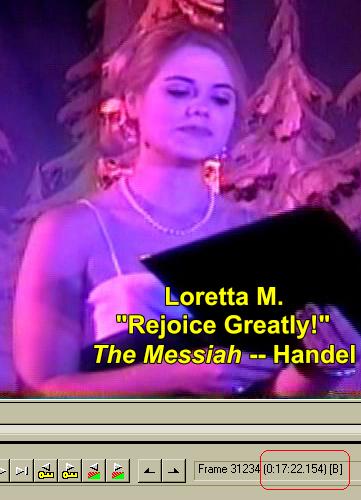
2. Start watching your home movie. When you spot the place
for the first subtitle,
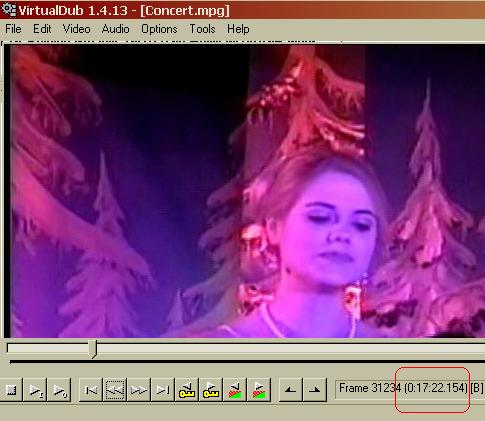
write down the time in the first column, and how long it should last in the
second column. In the last column, write the subtitle itself, or a short
phrase that will instantly remind you what the subtitle is.
Example:
Start Time:................Duration:..................Te xt:
0:17:22.154...............:06.00.................. ....Loretta M.
.................................................. .............."Rejoice Greatly!"
.................................................. ..............The Messiah
.................................................. ..............Handel
0:55:37.27 ................:07.00......................Letizi a I.
.................................................. ..............Concerto for Violin
.................................................. ..............First Movement
.................................................. ..............Mozart
Repeat this procedure until you have gone through your movie.
3. Launch Sub Station Alpha. Ensure the grey button labeled "D" (for dialogue) is depressed.
4. Type in the appropiate Start Time (1), skip the End Time, and enter the Duration (2). Tab to the large white box and type your first subtitle (3).
Notice "\n" is used as a line break. Hit Return. The program updates the End Time automatically. When you have loaded all your subtitles, save the file as an .ssa file. Leave Sub Station Alpha open.
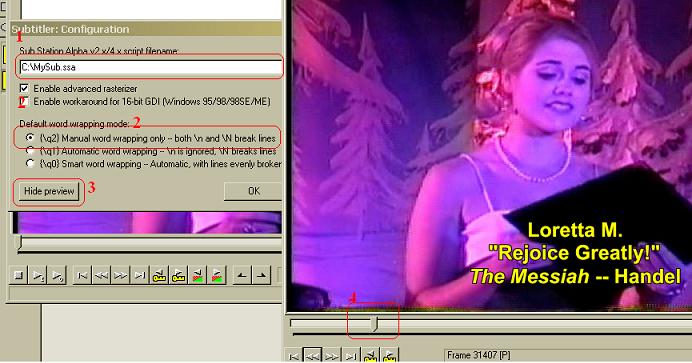
5. Now open Virtual Dub and load your video. Select Video-->Filters. Select Add, and when the filters menu opens, select Subtitler. Load the .ssa file (1), select option "\q2" (2)and select Show Preview(3). Use the slider (4) to find your first subtitle.
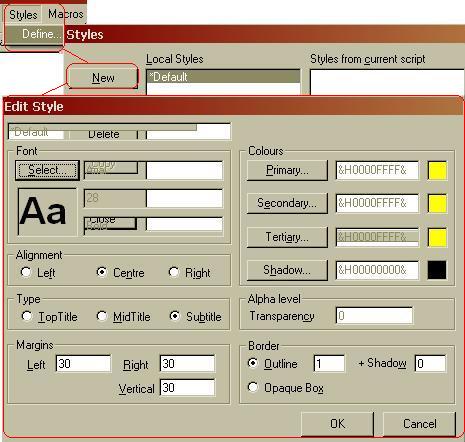
6. If the font is too small, too large, wrong color, etc. return to Sub Station Alpha. Open Style-->Define....Select Default or open a New style and change the font attributes. If you have to change the text or add/delete a line break, remember to hit Return before saving, or the chanfge will not take place.
Save again and repeat 5tep 5. If the video is correct, close Sub Station Alpha and save the file or frameserve to
your encoder.
Thanks to Baldrick, BJ_M, and MJPollard for their great help! Thanks guys!
+ Reply to Thread
Results 1 to 30 of 58
-
Hello.
-
I'm a MEGA Super Moderator

- Aug 2000
- Sweden


The sub station alpha site seems to be dead http://www.eswat.demon.co.uk/ . Or is itjust here? I was going to add it to the tool list and your guide to the guides list.
-
Please click here. The site is in Spanish, but they do have version 4.08.
Hello. -
I'm a MEGA Super Moderator
- Aug 2000
- Sweden
-
Does anyone know if ssa is dead(no longer updated) or if it is some temp problem with authors main site???
-
Hi Tommyknocker.
How are you? Thanks for your guide, it's great. -
I am fine. Thanks. I am glad you like it.
Hello. -
Never dealt w/ subtitles before, but since my recent purchase of a MiniDv camcorder Im sure I will want to utilize this info some time for my home movies of my kids games and programs. Looks good Tommyknocker. thanx
-
My pleasure. Hoom, hoom. (What did I just say?)
 Hello.
 -
Very nice! Just what I've been looking for for quite a while. One nit-pick, though: you might want to mention that the SSA subtitle filter will have to be downloaded from the VirtualDub site, as it's not included in the distribution (at least, it wasn't in mine). Heck, it wasn't obvious to me; I had to play a hunch.
 Don't sweat the petty things, just pet the sweaty things.
 -
SSA links (main htpp site is dead) for latest version 4.08
ftp://212.75.96.170/programy/do_filmow_divx/ssa/ssainstall.exe
ftp://ftp.ksgry.pl/programy/do_filmow_divx/ssa/SSAinstall.exe
ftp://ftp.komputerswiat.pl/Programy/do_filmow_divx/SSA/SSAinstall.exe
ftp://anime.jyu.fi/pub/SSA/SSAinstall.exe
Stream Sub Text is supposed to be good also and more features than SSA (demo on thier site)
http://hem.passagen.se/jmorones/Pages/StreamSubText.htm -
That was no nit pick, it was big mistake I made. Thanks for pointing that out. I acknowledged yours, Baldrick's, and BJ_Ms help in my re-edit. Thanks!Originally Posted by MLPollardHello.
-
Hello All,
I d like to say thank you for the guide it works well. I do however have a question, I have a DivX that I want to add an .ssa file to, do I have to create a new DivX with the added ssa or can i load it into Tmpg directly somehow?
Im guessing this is called frameserving. Thus far I have actually had to resave the original divx as a new divx (which takes approx 3 hours on my old clunker PC) then go to TMPG to encode.
thanks
TonyWhats wrong with 352x480? -
You are right, if youu frameserve your DivX video with its subtitles from Virtual Dub, you can go right into encoding with TMPGEnc. Click here for guide.
Hello. -
Following the guide i saved to a new avi but got no subtitles under it. I don't want to frameserve but only a new divx with subtitles. What can i have done wrong?
-
Could you email me the subtitles?
Hello. -
Yes i can ofcourse, but don't understand why! i send them to you.
-
If they require certain settings to work, I can simply tell you what they need to be, that's all.
Hello. -
Okay, I got you subtitles and they displayed okay in my version of Virtual dub, and I sent you screen captures. I noticed I did have to adjust VDub to its maximum size when viewing the the new video. tell me what you found out.
Hello. -
Yes, it worked! Thanks for your advice!
-
My pleasure!
Hello. -
Hello. Just a question...
I've added the .ssa file into the subtitle filter (VirtualDub)...
Now when you say that you save to your encoder, what do you mean by that?
Please enlighten me.... -
Here you can either save the file as an AVI, or frameserve it to TMPGEnc Plus, to save it as an MPEG or other format.
Hello. -
How come when i go to show preview it doesn't show the sub title? i've converted a real text file into an SSA file, i open virtual dub and try to add the titles but it doesn't show them, can u guys help me?
-
Could you email the ssa file to me? Use the email address in my profile.
Hello. -
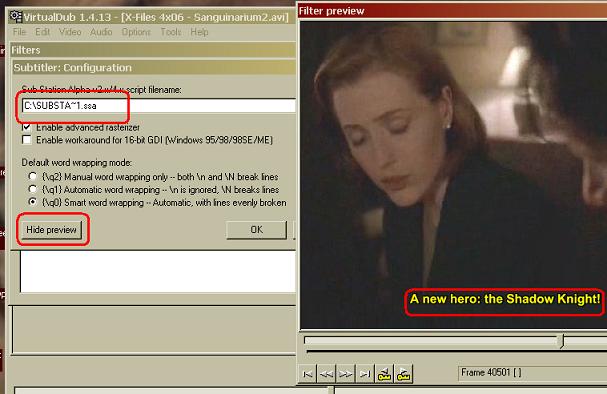
Unfortunately, I found nothing wrong with your file, as you can see:Originally Posted by Tommyknocker
Have you also tried the TextSub filter in VobSub?Hello. -
then why won't it work? it seems strange that it doesn't show.
-
is there something that i would need in virtual dub to make it work? cause it wont show the sub titles. It should saw them no?
-
Ok, sorry, but i just have to ask, what if i sent you the file and u did the adding the sub titles for me? cause I have no idea what the problem could be. there has to be anm explonation to this mess. thanks again and sorry for posting again.
-
Sure, if the file isn't too big to send.
Hello. -
I think u might be busy for a while cause I have alot of these types of files. I might need to make them into rar files, unless u have access to and FTP client if so I could give yeah the info for the ftp then u can download the files u need. it's up to you cause i need this done for a friend of mine

 Quote
Quote Visit Homepage


Similar Threads
-
Adding SSA subtitles to MP4 files
By ngngokkiu in forum SubtitleReplies: 19Last Post: 21st Feb 2012, 05:24 -
explorer.exe high memory usage while trying to load ass/ssa subtitles
By Nightroad in forum SubtitleReplies: 2Last Post: 17th Jan 2012, 17:36 -
Tool to convert SRT/SSA to Sony DVD Architect subtitles ?
By miguelos_net in forum SubtitleReplies: 4Last Post: 4th Dec 2011, 20:48 -
Low Sound Output After Adding .ssa to .avi
By edlimym in forum SubtitleReplies: 4Last Post: 12th May 2010, 07:02 -
error message when adding SSA. file to virtual dub
By fredsieg1937 in forum SubtitleReplies: 1Last Post: 24th Sep 2009, 20:53