
VideoHelp.com forum archive
http://www.photodex.com/eid8898/products/proshowgold


Forum Archive Home -> Subtitle -> How to add permanent subtitle to a video with virtualdubmod


How to add permanent subtitle to a video with virtualdubmod
Baldrick posted 2005 Jun 28 04:37
New! If this looks like much work try instead AutoGK, see http://forum.videohelp.com/viewtopic.php?t=316471


Guide
Download and install/extract Virtualdubmod.
If you don't have the subtitles create your own text subtitles with SubtitleWorkshop or Substation Alpha and then continue with this guide to add them permanent to the video.

Download Vobsub 2.23.
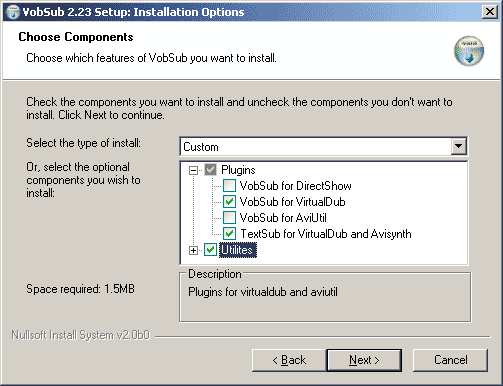
When you install VobSub be sure to select VobSub for Virtualdub and TextSub for Virtualdub and AviSynth under Plugins:


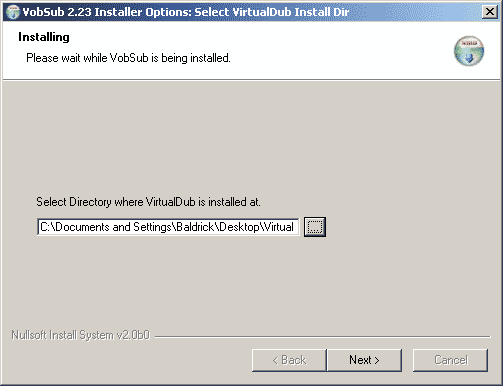
Set the Virtualdubmod folder:


In Virtualdubmod open your video. (If a message popups that VBR audio stream detected just select NO)
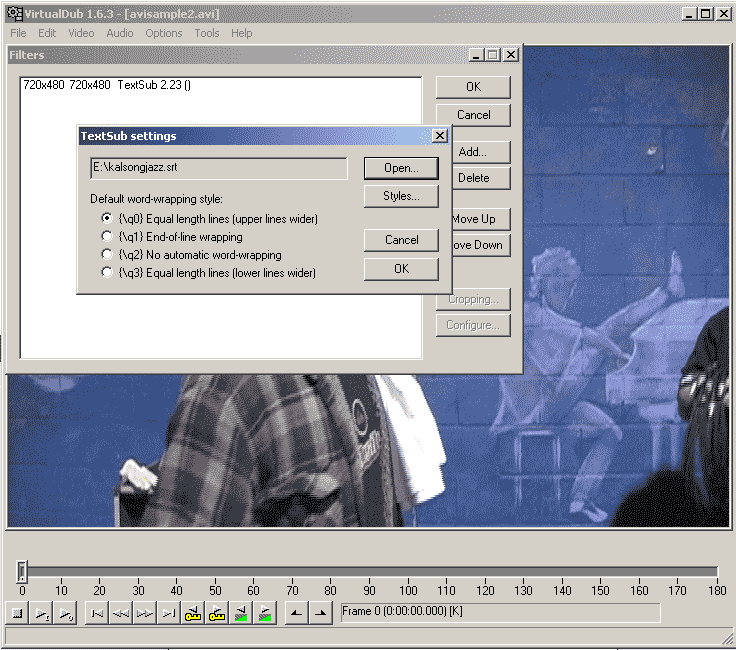
Add the TextSub filter under Video->Filters.
Open the srt, sub(text), smi, ssa subtitle.
(If you have an idx/sub/ifo subtitle add the VobSub filter intead.)


Set Video->Full Processing.
Set Video->Compression and select Divx or Xvid. Install DivX Codec or XviD Codec if you can't see the in the compression list.

And last save as a new AVI, File->Save AVI.
(If you want to convert directly to a VCD, SVCD or DVD MPEG2 frameserve to an mpeg encoder, read this guide.)


Problems
I can't install Vobsub. Vobsub wont work.
Try use latest VSFilter instead. Install it and then copy the VSFilter.dll to the plugins folder under the Virtualdubmod folder and rename it to VSFilter.vdf. Like c:\program files\virtualdubmod\plugins\VSFilter.vdf

VBR audio stream detected
Just select NO.

Can't see any DivX or XviD in the compression list
Install the DivX Codec or Xvid Codec.

Can't open the video
Identify the video codec with Gspot or avicodec. Then download and install that codec, usually DivX Codec or XviD Codec or try ffdshow(and enable VFW decoding)

The source image format is not acceptable (error code -2). Or other problems.
Read http://forums.virtualdub.org/index.php?act=ST&f=4&t=6608&


More subtitle and virtualdub links
http://www.videohelp.com/sefy/?id=textsub.html
http://www.videohelp.com/sefy/?id=frameserv3.html
http://www.videohelp.com/virtualdubedit
http://www.doom9.org/index.html?/virtualdub_procedures.htm

If this looks like much work try instead AutoGK, see http://forum.videohelp.com/viewtopic.php?t=316471


dark_necrofear posted 2005 Jul 12 06:53
Thanks for your tips. I have come to the final step of saving the .avi, and i am getting the following error:

video compression error: The source image format is not acceptable. (error code -2).

Any ideas what this means?

Cheers

Mick


dark_necrofear posted 2005 Jul 12 07:12
no dramas, i have fixed all my problems. :D


dark_necrofear posted 2005 Jul 13 07:17
Hey all,

I have encoded my movie, and it has all worked fine. Problem is the subtitles have not come out at all properly. They are coming out as rectangles. I dont believe the .ass file i received is any good. Here is the contents of the file (this is not the whole file, but does show the top, as well as the start of the dialogue). When i tried to copy the text into this message, the text was in japanese. Does this mean the subtitles are possibly in japanese???

http://www.joeysfc.com/images/screen1.JPG

edit: too big image...try reduce the width..you are messing up my guide. /Baldrick :)


Baldrick posted 2005 Jul 13 07:22
You must probably select a japanese font under Styles to be able to add them.


bruce leroy posted 2005 Aug 01 15:06
Hi, I got all the way up to adding subtext as a filter, but my filter box comes up empty. When I hit add filter, I don't see a tab for adding subtitles. Did I load the wrong version of subrip or subvob?


bruce leroy posted 2005 Aug 01 23:09
Nix that guys, I figured it out. Works great! Thanks!


qknet posted 2005 Aug 04 20:18
that's great and works with me. Thanks. But one more question: my avi is already compressed (XVID) so how can I merge it with srt without downgrading its quality during the recompression process?

How can I config divX or/and Xvid to achieve such objective?

(using the default value of divx results in crab)

:?:


celtic_druid posted 2005 Aug 04 20:21
You can't. Hard encoding subs means re-encoding and both XviD and DivX are lossy codecs so you are going to loose quality everytime that you re-compress.


qknet posted 2005 Aug 04 20:30
One more thing :D

It is possible to add black part to the bottom (top) part of the movie so that the subtitle will not cover the movie itself?. I reconk there's a way there which I don't know as you can crop it off then you can put it back in. Pls tell me how . :)


Stormin Norman posted 2005 Aug 04 20:37
qknet, you can add borders with avisynth and reposition your sub text lower.

I agree with celtic_druid (seperate streams for me please!).


qknet posted 2005 Aug 04 20:38
:
You can't. Hard encoding subs means re-encoding and both XviD and DivX are lossy codecs so you are going to loose quality everytime that you re-compress


You are right. But how to minimize the downgrading? Which setting should be selected in DivX or Xvid?

Actually, what I am getting at is showing my avi in my DVD player that support DivX and Xvid. the player can load srt but the font size is too small and it fails to display vietnamese (unlike vobsub huh?). So if you can advise me with another type of subtitle then i would highly appreciate it. Making permanent subtitle is the last resort.


celtic_druid posted 2005 Aug 05 04:17
Vobsubs or xsubs.
To minimise the quality loss encode at a low average quant, although that may push the bitrate too high for the player. It also means that the result will be larger than the source.


Baldrick posted 2005 Aug 05 04:22
you can add borders with virtualdub...video->filters->resize and expand.

and please keep this topic about permanent subs. if you want make somethinge else make a new topic.


bruce leroy posted 2005 Aug 06 00:32
After running this through on a couple of movies, I find my audio gets out of sync in the dubbing process. Is there a way to fix this?


bubblegum113 posted 2005 Sep 01 11:02
I have no problem following your guide but everytime I get to this part: Open the srt, sub(text), smi, ssa subtitle. I have no idea what to do. anything i open leads to a dead end. what exactly do you mean by this? Does it matter that i have an avi video file (downloaded from edonkey) and not a dvd video file? All i'm trying to do is get english subtitles for my japanese video file.


chaos_maiden posted 2005 Sep 03 17:27
this is working fine for the most part, i have gotten it to work perfectly for putting subs back in some ogm files i converted to avi, but converted some mkvs as well, and when i put the subs back in, they don't synchronize with the video, there is a significant amount of lag between the video and when the subtitle appears. does anyone have any ideas on how to fix this?

edit: on further analysis, the audio is synchronized with the subtitles, but both are lagging behind the video by a minute or more


nojay posted 2005 Sep 09 18:03
I'm trying to edit hardsubs from an .srt file extracted from a .mkv container into a .avi taken from the same container. If I run Media Player Classic with both .srt and .avi files everything looks OK so I assume the raw files are not corrupt.

When I try and install VobSub2.23 it proceeds all the way through to the end but doesn't terminate properly. I have to go into W2K Task Manager and kill it explicitly. I don't know if this affects its operation or whether it's just an annoying bug and the installation has been completed successfully.

I use VirtualDubMod by preference and when I select the TextSub filter I get the appropriate options as shown on the howto. However when asked to select a subtitle file I choose the .srt file and click OK. The TextSub filter returns to the basic option screen where the [OK] button is greyed out. The text box that should hold the subtitle file name is blank. Nothing I can do seems to be able to get past this point.

Any ideas? Is there an earlier version of VobSub that maybe works?


dvasco posted 2005 Sep 09 22:55
This is awesome! It helped put togethor a CC to sub project that I started 11 months ago. This with mpg2srt, the frameserve HOW-TO, and someone's VOBsub position recomendation put it all together.

I just wish I could remember which post taught me the VOBsub positioning trick.

Thanks a million guys!


dvasco posted 2005 Sep 09 23:38
It was Baldrick to the rescue again that lead me on the path to trying to position the subtitle at http://www.videohelp.com/forum/viewtopic.php?p=1288676#1288676


chaos_maiden posted 2005 Sep 13 00:02
nojay :
I'm trying to edit hardsubs from an .srt file extracted from a .mkv container into a .avi taken from the same container. If I run Media Player Classic with both .srt and .avi files everything looks OK so I assume the raw files are not corrupt.

When I try and install VobSub2.23 it proceeds all the way through to the end but doesn't terminate properly. I have to go into W2K Task Manager and kill it explicitly. I don't know if this affects its operation or whether it's just an annoying bug and the installation has been completed successfully.

I use VirtualDubMod by preference and when I select the TextSub filter I get the appropriate options as shown on the howto. However when asked to select a subtitle file I choose the .srt file and click OK. The TextSub filter returns to the basic option screen where the [OK] button is greyed out. The text box that should hold the subtitle file name is blank. Nothing I can do seems to be able to get past this point.

Any ideas? Is there an earlier version of VobSub that maybe works?


i had the same issue with the vobsub installer, but i use it in virtualdub and everything is fine, so i assume it is some sort of annoying glitch in the installer.

i attempted to use the textsub filter in virtualdubmod with no success, so i went back to virtualdub and everything worked fine, however i've had issues getting the audio and subs to align with the video properly in converted mkv's.


Infinita posted 2005 Sep 26 12:41
V=It all went smoothly, but when I tried to play the video in one of my media players, the video had a small error and lagged greatly behind the audio.

So I tried it again..

Again, same spot at the start of the movie were it freezes for a bit, then is delayed.

Any ideas why it happened?

When I replay the new subtitled video in Vobsub - it worked fine, no delay in the video and didnt freeze.


XDelusion posted 2005 Oct 08 15:16
..nevermind.


chaos_maiden posted 2005 Oct 08 15:20
XDelusion :
Uuuuuummmmmmmm.

OK

I load up my video file, FINE.


I then goto Video/Filters.


And.... THERE IS NO WAY TO LOAD SRT FILES!

What gives?


did you specify the correct location of virtual dub when you install the text sub filter? and did you install the text sub plugin for virtual dub to begin with? it isn't checked by default, so this is really easy to do, i had to install vobsub twice because i missed that the first time


XDelusion posted 2005 Oct 08 19:02
Turns out, I clicked on the box to set this up, but it didn't register with winblows apparently. :)

Re-installed, made damn sure the box was clicked and now all is well, thankx for the tutorial!


SilverStone641 posted 2005 Oct 09 00:17
hello, great tutorial. I did have an error though. When i get my video into virtualdub and add in the .sub subtitles and playback, the titles either come way before they talk, or way after. it throws everything off. Is it a problem with the sub file? Or am i doing something wrong?


thanks!!


celtic_druid posted 2005 Oct 09 01:38
Sounds like a problem with the subs. Were they in sync when you watched it?

Also I would suggest that people use VSFilter instead of VOBSub. VOBSub was replaced with VSFilter, VSRip, etc. some years ago and VSFilter contains newer versions of textsub/vobsub plugins for VDub, also for AVISynth which would be better anyway since it doesn't require a RGB24 colourspace conversion.


Booooom posted 2005 Oct 09 04:26
Great post...
Whenever I added forced subtitles to an AVI, I got sync problem between the audio and video. To solve this I now use the VirtualDubMod and since then I stopped having any sync problems.

Additional notes:
Please make sure that when adding subtitles, under the Styles... option, you are setting the correct frame rate.
I also noticed that when rencoding using the latest XviD, in the Calc option (XviD MPEG-4 codec-->Configure-->Calc), make sure again that you are selecting the correcting frame rate.

Enjoy


SilverStone641 posted 2005 Oct 09 14:05
those tools seemed to sync up the subs with the talking, but now, action happens, then like 10 seconds later, I hear the sounds related to that action. I dunno what the problem is. I'm going to save out the video in the hope that it's my computer.


Any ideas what would cause this?


anabellita posted 2005 Oct 10 04:26
are you sure the original subtitles were synched with the audio? Try them out with something like BS Player or Subtitle Workshop itself... If the problem was with the source subtitles, then SW will allow you to easily synchronize.
SilverStone641 posted 2005 Oct 10 10:38
yeah, i've tried them in a player and they matched perfectly. No outta sync moments at all. But whenever i preview them in virtualdub the get out of sync. I don't know what the issue is. I'm looking around for other options.

BTW, is there a way to burn this avi onto a DVD and add in the subtitle file so you can choose to have them on or off? I searched this forum but all i could find was references to removing subs from a DVD and all that.

thanks again!


Abond posted 2005 Oct 10 10:55
Any authoring software that support subtitle multiplexing will do it.
Here is a list:http://www.videohelp.com/tools?s=2#2. But some of them do not support subtitle multiplexing.


anabellita posted 2005 Oct 10 10:58
just look in the stickies! Depending on what you want to do:

http://www.videohelp.com/forum/viewtopic.php?t=267454

http://www.videohelp.com/forum/viewtopic.php?t=267417

If that doesn't help, check out the guides...

Here's one:
http://www.videohelp.com/guides.php?link=729

but most authoring softwares support switchable subtitles


SilverStone641 posted 2005 Oct 12 14:12
ok, i've looked at those posts, and tried a couple of apps, AVI2DVD, MovieMachine, and DIKO. I think DIKO gave me the best results but heres the problem. It encoded the whole movie and output an MPV file. Heres the first problem, i played the MPV file and it was only 35 minutes long! my movie is 100 minutes. It did add the subtitles perfectly though. Also, with the outputs, it output a VIDEO_TS and an AUDIO_TS folders with nothing in them. It left me with unmixed video and audio files outside of the _TS folders. It didn't create vobs or IFOS whats the deal?

i thought i had it for a second!


bmwracer posted 2005 Oct 14 16:51
Guh, I can't even get started: VobSub won't install... I direc tthe software to the directory where VirtualDub is located, but it says it can't find it... WTH???


celtic_druid posted 2005 Oct 14 22:10
Use VSFilter instead. Simply rename vsfilter.dll to vsfilter.vdf and place in the plugin's dir.


kgonepostl posted 2005 Oct 17 21:23
Anybody know how to fix the
"The source image format is not acceptable. (error code -2)"

seriousely necro you should post your solution. I'm getting the same error.


bmwracer posted 2005 Oct 18 11:49
kgonepostl :
Anybody know how to fix the
"The source image format is not acceptable. (error code -2)"

seriousely necro you should post your solution. I'm getting the same error.

I got the same error when trying to use the DiVx encoder, so I ended up using the xViD encoder instead.


kgonepostl posted 2005 Oct 21 01:13
i'll let you know my results with an edit.

Edit: everything seems to work properly I thank you. I was almost positive I tried this already but I must have forgot....silly me.


masadar posted 2005 Oct 26 02:33
well hello ive followed this guide to a T yet when i try to save the file as an avi with virtualdub the subtitles wont come through so i tryed to frameserve it and it still didnt have subtitles in the final product if anyone can help me that would rock thanks ppl!


marthin posted 2005 Oct 26 05:43
i try to install VobSub complete, it ask me 'Select Dir where Dit AviUtil is placed at' then what should i do ? did i put VirtualDub installed directory or ?


Baldrick posted 2005 Oct 26 06:08
marthin: you must have selected vobsub for aviutil, you should select vobsub for virtualdub. see the first screenshot in the guide. or use vsfilter, see the tips in the guide.

masadar: do you see the subs in the virtualdub preview window?


arraf posted 2005 Oct 31 11:10
I tried to add arabic subtitles to the jungle book
I see strange caracters only, when I play the same
subtitle.srt file with BSplayer and change the font
setting into arabic I get the right carecters

when I open the srt file with notepad it appears in strange characters
what should I do or where should I refer for help

I solved this problem now I want that letters be bigger in size
how do I do it

zaher


el_38 posted 2005 Nov 05 20:32
Hi i was trying to follow this tutorial but when i tried to encode it again the audio doesnt fits with the video


el_38 posted 2005 Nov 05 20:34
Hi i was trying to follow this tutorial but when i tried to encode it again the audio doesnt fits with the video what can i do ?

and when i open a file it says that Virtual dub has detected an improper vbr audio encoding in the source avi file and will rewrite the header with standar values. This is why i have defased audio? I have k lite mega codec pack

What can i do ? thanks


celtic_druid posted 2005 Nov 06 02:10
Follow the advice in the warning or use VirtualDubMod instead since it can handle VBR mp3 audio.


Baldrick posted 2005 Nov 06 12:24
did you use virtualdubmod or virtualdub?? use virtualdubmod and reread my guide again.


vhelp posted 2005 Nov 06 22:54
Sorry if this is the wrong area to post :roll:

Looking around, and still haven't figured it out yet.. getting
TEXT onto my video as a subtitle. I thought this GUIDE would help,
but so far, all I found close, was vsfilter and vobsub 2.3 filter
is part of the install (plugin) which I did install.

In vdub, vobsub 2.3 is listed, but I can't TYPE text to overlay
onto my video -- ArGGG!

Am I missing something.., like a .vdr filter ?

Thanks for any tips :)

-vhelp 3633


celtic_druid posted 2005 Nov 07 03:04
You need to create a subtitle file seperately. If you just want to overlay a small amount of text check out AVISynth's subtitle filter.


N3kr0 posted 2005 Nov 15 14:01
Hi, ppl, tried to convert a 711 mb file with the subtitle and i choose
Home Theather Profile with the "Bitrate of 780 kbit/s", and "balanced
quality", the file was compressed to 511, witch scared me... :D
the quality was good, when i tried in the standalone divx player,
I tried the "Better quality"; "Extreme..."; and "Insane...", just to see the
result on picture on the right, and what i understood was - the insane will
have the most powerful compression, say 100 ou 200 mb, and the quality
will be.. well... insane... have any of you tried this settings?
I am now trying with the "Home Theater Profile" choosing my own bitrate,
the default is 780 kbit/s, i will try 900.

Could anyone give some feedback on this, must we, just, let the program
work with the default settings? Or a bigger file size would have better quality?

I do not know if this is the right place for this discusion.

Thanks for any word.


celtic_druid posted 2005 Nov 16 03:31
Balanced, better quality, insane, etc. will all be the same size if you are encoding to a set bitrate. Insane should look the best though, but a lower setting shouldn't look much worse and should be much faster.

Might I suggest a bitrate calculator to get the bitrate for the output size that you want.


qingren posted 2006 Jan 10 03:41
dark_necrofear :
Thanks for your tips. I have come to the final step of saving the .avi, and i am getting the following error:

video compression error: The source image format is not acceptable. (error code -2).

Any ideas what this means?

Cheers

Mick


hi.. i cant find the textsub lei..


kschang posted 2006 Jan 10 10:53
As asked in the original guide... Did you INSTALL the plug-ins?!?!?!


qingren posted 2006 Jan 13 09:23
kschang :
As asked in the original guide... Did you INSTALL the plug-ins?!?!?!

oops, i install in the wrong location. thanks


qingren posted 2006 Jan 13 09:40
bruce leroy :
Nix that guys, I figured it out. Works great! Thanks!
solved liao, me too. :)


qingren posted 2006 Jan 13 09:43
nojay :
I'm trying to edit hardsubs from an .srt file extracted from a .mkv container into a .avi taken from the same container. If I run Media Player Classic with both .srt and .avi files everything looks OK so I assume the raw files are not corrupt.

When I try and install VobSub2.23 it proceeds all the way through to the end but doesn't terminate properly. I have to go into W2K Task Manager and kill it explicitly. I don't know if this affects its operation or whether it's just an annoying bug and the installation has been completed successfully.

I use VirtualDubMod by preference and when I select the TextSub filter I get the appropriate options as shown on the howto. However when asked to select a subtitle file I choose the .srt file and click OK. The TextSub filter returns to the basic option screen where the [OK] button is greyed out. The text box that should hold the subtitle file name is blank. Nothing I can do seems to be able to get past this point.

Any ideas? Is there an earlier version of VobSub that maybe works?
ermmm... how to run Media Player Classic with both .srt and .avi files ar?


qingren posted 2006 Jan 13 10:59
celtic_druid :
Follow the advice in the warning or use VirtualDubMod instead since it can handle VBR mp3 audio.


VirtualDubMod is 1.5 is it? in my VirtualDub is 1.6. My 1.6 now got text sub but the video the sound is not sync. 1.5 it don have the text sub even i had done the above. pls help :(


celtic_druid posted 2006 Jan 13 22:57
You need to copy VSFilter to both apps plugin dirs. VDubMod won't detect plugins in VDub's plugin dir and vice versa.


Jpesker posted 2006 Jan 16 14:19
Thank you, Baldrick.

Finally, a helpful guide that gets the job DONE!!! I have been reading help guides for about 15 hours now where a few sent me down a road where I almost gave up and called it quits, but I stuck with it, and all I wanted was just to do a 45 minute Subtitle project:

Subtitles I opened with Notepad from an SRT file, and trimmed down and resaved just the subtext I needed. Then permanently hard encoded them from the AVI to a newly saved AVI. Easy once someone walked me threw it.

Cheers.


ks32561 posted 2006 Jan 29 01:40
I have a bit of a problem, can I use the original VirtualDub to do this? I know the OP said to use VirtualDubMod, but the afterdawn tutorial I am using tells me to use virtualdub original to enocode the first and second pass of my video. What can I do?

Also, should I have the vobsub filter on both first and second pass?


celtic_druid posted 2006 Jan 29 02:48
If you are just encoding video, then regular VDub is fine. Can't see any reason why you couldn't use VirtualDubMod instead though, they are basically the same in terms of usage.

You should definatly have the filter on for both passes. Same goes for all filters.


shukero posted 2006 Feb 06 16:54
Hello I'm having trouble putting in about 5 .ass files into one of my .avi you see, When I put them in with the new sv filter 2.37 or w/e and I add them to my .avi (divx 6.1) and encode it in xvid 1.1 like right after about 3 seconds of the video it lags for a second then the sound is off and the video is as choppy as hell. I was wondering what the problem is. I was wondering if someone could tell me what the correct fps's are for .ass file and how to tweak my xvid settings to fix this. This is funny cause when I play it on my virtualdubmod in "file > preview output form start" it does lag or anything, but when I encode it it lags. Please help me!


HomelessBird posted 2006 Feb 11 23:52
Thanks for the guide ! It does really help ! I just have couple questions. Is there anyone know why the new avi file comes out seem smaller than the source ? I put in a 700MB video it comes out around 400MB . Is there any way to keep the same quality, I dont mind the larger files ...


kschang posted 2006 Feb 12 10:32
HB, you have to use GSpot on the original video file, figure out its bitrate and settings, then set the same in the encoder settings before you starting re-encoding with the subtitles.


celtic_druid posted 2006 Feb 12 22:32
Using the same bitrate, will give you the same size, but not quality. For the same quality, the size would have to go up since a) you are recompressing and b) subtitles are hard to compress and you are adding them.


trash posted 2006 Feb 13 01:51
I followed the instruction but when I open my video file in VirtualDubMod, I have an error message
Can't locate decompressor for format XVID( unknown). VirtualDub requires a Video for Window(VFW) compatible codec to decompress video. DirectShow codec such as those used in Windows Media Player are not suitable. Only 'Direct Stream copy' is available for this video.

Please let me know what. I am new at this so dont understand much so please keep it as simple as possible. Thanks for your patience and all the help


kschang posted 2006 Feb 13 02:34
What OS are you on? I had the same problem when I was on Win98. I ended up compressing to Microsoft MPEG4 V3 (which can also be played by XVID)


celtic_druid posted 2006 Feb 13 04:32
You can't recompress to anything if it is locked to direct streaming and XviD can't decode MS MPEG-4 V3 (aka DivX 3) since it isn't really MPEG-4.

You just need to have XviD installed. ffdshow with VfW decoding for XviD enabled would also work.


chinkymoomoo posted 2006 Feb 17 09:16
Help!!!

I'm using VirtualDubMod to permanently add subtitles to my .avi file. But an error occurs when I try to save it as a new file. The error that pops up is:

Error decompressing video frame 0: An unknown error occurred (may be due to corrupt data). (error code -100)

Does anybody know a way that i can deal with this? Thanks so much for any help that i can get!!!


kschang posted 2006 Feb 18 10:05
Error decompressing? Sounds like original file's corrupt, but that wouldn't make any sense...


HomelessBird posted 2006 Mar 08 22:58
celtic_druid :
Using the same bitrate, will give you the same size, but not quality. For the same quality, the size would have to go up since a) you are recompressing and b) subtitles are hard to compress and you are adding them.

Then how can I keep the quality the same ? I dont mind the bigger size thoug h ! Thanks ! 8)


Mithzamon posted 2006 Mar 16 09:00
Hi :)

Just want to drop by a thanks for this very nice guide!

I've got a lot of .ogm and .mkv files that I want to play on my DVD-player and my Zen Vision:M, and to do that I need DivX/Xvid files with subtitles (mostly anime, and my japanese is kinda... bad ^^).

I had no problems demuxing the audio and subtitles, but I couldn't seem to be able to code the subs into the .avi file afterwards, but thanks to this guide I'm now able to convert all my files without any problems at all! :) Thanks a lot, really useful for me.


Baldrick posted 2006 Mar 16 09:29
or use alltoavi, all-in-one mkv, ogm to avi with subs.


Mithzamon posted 2006 Mar 16 10:35
Baldrick :
or use alltoavi, all-in-one mkv, ogm to avi with subs.

:o

Woah, that's awsome. I really should've checked around a bit more on the site ^_^ Giving it a go now.

Edit: AlltoAvi works pretty nicely, the only thing I'm wondering about is if it's some way possible for me to change the font size of the subtitles?


danroberto posted 2006 Mar 20 06:29
THANK you for this! I'm using VirtualDubMod to permanently add subtitles and it works GREAT.

One thing: what if I have a .srt. that does not sync with the .avi? Can I do something about the .srt timing in VirtualDubMod (like to start a 1-2 seconds later...)?

TIA


kschang posted 2006 Mar 23 11:19
Adjust the SRT with VisualSubSync or Subtitle Workshop


JoeyR posted 2006 Mar 29 19:14
trash :
I followed the instruction but when I open my video file in VirtualDubMod, I have an error message
Can't locate decompressor for format XVID( unknown). VirtualDub requires a Video for Window(VFW) compatible codec to decompress video. DirectShow codec such as those used in Windows Media Player are not suitable. Only 'Direct Stream copy' is available for this video.

i had this same problem, only i it is WM3 instead of XVID. I have ffdshow, but that didnt help, do i need to tweak the settings at all?


celtic_druid posted 2006 Mar 29 22:07
ffdshow can decode WMV 9, check that it is enabled. The other option is MS's WMV9 VCM codec.


JoeyR posted 2006 Mar 30 21:00
thanks a bunch celtic_druid


lovelylil819 posted 2006 Apr 15 16:33
I have the same question as 'HomelessBird'. Fansub groups for asian drama and anime have files that are 700 MB and when they encode them, the files still maintain at 700 MB. The quality seems to be the same, also. Did they use separate streams or something to keep the quality and size the same? If so, is there a guide for that? Thanks in advance! :D


abazabam posted 2006 Apr 16 19:06
I had the same problem. When I tried to convert a DivX video to Xvid it said "Error decompressing video frame 0" and I just clicked the "Video" menu, clicked on "Error mode...", and selected "Decode even if the result may be garbled". After I did this, I no longer got the error message. I didn't let it convert the whole thing because as soon as I saw that the error message didn't pop up, I just stopped it. So I don't know if it will work out 100%.


parfety posted 2006 May 19 11:02
JoeyR :
trash :
I followed the instruction but when I open my video file in VirtualDubMod, I have an error message
Can't locate decompressor for format XVID( unknown). VirtualDub requires a Video for Window(VFW) compatible codec to decompress video. DirectShow codec such as those used in Windows Media Player are not suitable. Only 'Direct Stream copy' is available for this video.

i had this same problem, only i it is WM3 instead of XVID. I have ffdshow, but that didnt help, do i need to tweak the settings at all?


i have this problem too, i still cant get it working
i am really clueless with these thigs, can someone please tell me what to do, because when i laod my avi movie i get that error,

sorry kinda new at these thigns :oops:

hope you can help me :)


Abond posted 2006 May 19 11:12
Download and install XviD codec


parfety posted 2006 May 19 15:41
lol that was all

man i feel stupid thanks annywayz :D


maryah posted 2006 May 20 03:11
This method works very nicely to make DivX files of interviews recorded from TV and subtltled from a text translation. Thank you!

But is there a way to change the output resolution to 640 x 480 instead of the default 720 x 480? It seems to be locked at that size.

640 x 480 creates a more accurate looking aspect ratio when played on the computer.


Baldrick posted 2006 May 20 03:22
add a resize filter under video->filters and resize to 640x480 and use lanczos resize.


maryah posted 2006 May 20 03:36
Baldrick :
add a resize filter under video->filters and resize to 640x480 and use lanczos resize.
Wow! fastest response ever!

That ought to do it perfectly, thank you!

(Does the order of the 2 filters make a difference in performance or quality?)


Abond posted 2006 May 20 03:47
First resizing, then subtitles


maryah posted 2006 May 22 16:58
Thanks Baldrick & Abond. That worked great.

Next project: Using VirtualDubMod to grab a segment from a DVD, I'm trying to hard code the subtitles into the AVI. I added VOBSub 2.23 in the filters, opened the IFO file for the VOB video file that's been opened. It finds the English subtitle stream and opens it, but I don't see the subs in the Output Preview. What's the trick?

If somebody knows where to find a guide for VOBSub 2.23, it would help. I can't seem to figure out how to use the location box shown at the right side of the filter configuration dialog. It makes no sense to me. I'm sure I'm missing something obvious that's causing the subs not to appear. Thanks!

EDIT: Further searching brought up this guide: http://www.nanomessiah.com/dvd-backup/vobsub.html

which I folowed exactly, but I still don't get any subs. Hmmm.


chaos_maiden posted 2006 May 22 21:56
Well, I'm entirely sure if this is the thread where I should ask this question, but maybe somebody here can help me out. I have some mkv files, i have encoded the video and audio to avi using mencoder, but the subtitles didn't come through (even though it was set to encode those as well), and upon further examination, I discovered that the subs are of type (S/ VOBSUB) according to mkvextractgui, and mencoder is ignoring them because it doesn't recognize the type, also, I can't use mkvextract to extract the subtitle stream, because it doesn't recognize the format either. If anyone knows how to extract this type of sub and encode it into the avi, please let me know.


kschang posted 2006 May 23 00:05
You are supposed to start a topic for your question instead of posting in a unrelated (as far as I can tell) sticky topic.


celtic_druid posted 2006 May 23 01:52
mkvextract does support vobsubs as I am pretty sure mencoder does.

I agree though, this thread is about hard encoding subs with VDubMod. You are asking about demuxing and using mencoder. Not at all that related.


ZeroHour posted 2006 May 23 14:56
nojay :
I'm trying to edit hardsubs from an .srt file extracted from a .mkv container into a .avi taken from the same container. If I run Media Player Classic with both .srt and .avi files everything looks OK so I assume the raw files are not corrupt.

When I try and install VobSub2.23 it proceeds all the way through to the end but doesn't terminate properly. I have to go into W2K Task Manager and kill it explicitly. I don't know if this affects its operation or whether it's just an annoying bug and the installation has been completed successfully.

I use VirtualDubMod by preference and when I select the TextSub filter I get the appropriate options as shown on the howto. However when asked to select a subtitle file I choose the .srt file and click OK. The TextSub filter returns to the basic option screen where the [OK] button is greyed out. The text box that should hold the subtitle file name is blank. Nothing I can do seems to be able to get past this point.

Any ideas? Is there an earlier version of VobSub that maybe works?


I have the same problem. When i try to load the sub.srt, it wont show up in the grey box.

has any1 solved this yet? :(

help.jpg


celtic_druid posted 2006 May 24 01:10
I'd start by updating textsub (vsfilter). Could be that there is something wrong with the subtitle file though.


chaos_maiden posted 2006 May 25 23:30
ZeroHour :
nojay :
I'm trying to edit hardsubs from an .srt file extracted from a .mkv container into a .avi taken from the same container. If I run Media Player Classic with both .srt and .avi files everything looks OK so I assume the raw files are not corrupt.

When I try and install VobSub2.23 it proceeds all the way through to the end but doesn't terminate properly. I have to go into W2K Task Manager and kill it explicitly. I don't know if this affects its operation or whether it's just an annoying bug and the installation has been completed successfully.

I use VirtualDubMod by preference and when I select the TextSub filter I get the appropriate options as shown on the howto. However when asked to select a subtitle file I choose the .srt file and click OK. The TextSub filter returns to the basic option screen where the [OK] button is greyed out. The text box that should hold the subtitle file name is blank. Nothing I can do seems to be able to get past this point.

Any ideas? Is there an earlier version of VobSub that maybe works?


I have the same problem. When i try to load the sub.srt, it wont show up in the grey box.

has any1 solved this yet? :(

help.jpg


I've had this issue as well, I never had it until i installed the latest version of the programs, I'm not sure whether virtualdub or vobsub is at fault, since they were upgraded at the same time. However, it only affects .srt files, if you are working with a source that has multiple sub streams, see if it has a .ssa or .ass sub stream that you can use, or find a way to convert the .srt to that format. This seems to be a somewhat sporadic problem, rebooting before you begin or using virtualdubmod instead of virtualdub (or viceversa) might help.


dynek.pl posted 2006 May 26 05:56
chinkymoomoo :
Help!!!

I'm using VirtualDubMod to permanently add subtitles to my .avi file. But an error occurs when I try to save it as a new file. The error that pops up is:

Error decompressing video frame 0: An unknown error occurred (may be due to corrupt data). (error code -100)

Does anybody know a way that i can deal with this? Thanks so much for any help that i can get!!!


I have the same.
I noticed that it only concerns Xvid files.
I've installed new codec but I didn't help.
I use VIrtualDub-MPEG2 1.5.10.


foaley77 posted 2006 Jun 03 21:07
how can I convert a movie that has vbr in audio to cbr so I can use vobsub?
because when I use virtual dub 1.6 with vobsub the sound is out of wack


celtic_druid posted 2006 Jun 03 23:44
You could just use VirtualDubMod instead. Infact according to the title above me, that is what you are supposed to be using anyway. Personally I would demux the audio, sub using AVISynth and then remux the audio.

There was also a DSynth mod to AVISynth that would allow you to sub the video and direct stream the audio. Don't know if it has been updated lately though.


xetesx posted 2006 Jun 09 20:46
I've looked around for this prob but can't find an answer, I'm sure it's something really simple staring me in the face, that I'm just missing.

I can add subtitles with VirtualDub as explained in the guide, but when I save the avi to folder everything looks like its going fine, but within in 2 min's the new avi being created is hitting a size of 5 Gig yes GIG. The film is only 6 mins in so even with a 100 gig hard drive I'm goiing to fast run out of space.

Please what have I done wrong or not checked surely the redone file should be the same size roughly as the original.


manono posted 2006 Jun 09 21:59
Hi-

Please what have I done wrong or not checked surely the redone file should be the same size roughly as the original.

You haven't chosen and configured a codec (like XviD, DivX, etc.). You're saving it uncompressed.


oOone_luvOo posted 2006 Jun 18 16:16
Mithzamon :
Baldrick :
or use alltoavi, all-in-one mkv, ogm to avi with subs.

:o

Woah, that's awsome. I really should've checked around a bit more on the site ^_^ Giving it a go now.

Edit: AlltoAvi works pretty nicely, the only thing I'm wondering about is if it's some way possible for me to change the font size of the subtitles?


alltoavi worked great for me too.
it comes with default font arial size 12.

http://sourceforge.net/forum/forum.php?thread_id=1498318&forum_id=526958

this is the link that tells u how to change to subtitle size, it'll give the option of arial size 14, 18, 24 and 28


celtic_druid posted 2006 Jun 19 02:56
mencoder can scale ttf fonts to any size. Per that thread asking about colours though. To the best of my knowledge, mplayer/mencoder do not support coloured subs. Greyscale only.


Allanandrews posted 2006 Jun 19 21:01
Hi...I have a .avi file...how do I create a subtitle file using SubtitleWorkshop or any similar software.

Thanx
Allan


kschang posted 2006 Jun 20 20:49
You do a lot of typing, duh...


greator posted 2006 Jun 21 08:23
Does this tutorial works for .ass subtitle file?


celtic_druid posted 2006 Jun 21 10:45
textsub (VSFilter) accepts ass subs, so yes. Still recommend using textsub via AVISynth than VDub though.


greator posted 2006 Jun 21 12:27
I tried it...it worked but the avi xvid quality is bad...lower than the source file...any idea how to keep the video quality?

I tried frameserving by using Mainconcept (because its fast on my pc)....no video comes out..only green screen....


celtic_druid posted 2006 Jun 21 21:10
The green screen is a bug in MainConcept where by it incorrectly uses XviD for colourspace conversions. Uninstalling XviD will solve it or use AVISynth instead of VDub.

Basically the only way to have the same quality, is to use a lossless codec (massive filesize increase). Using a lossy codec such as XviD, you can never have the same quality. That said encode at fixed quant 2 and you probably can't see the difference. If you are aiming for the same size though... The codec has to deal with the old artifacts, whilst trying not to create more. Plus subtitles are not very compressable.


greator posted 2006 Jun 23 13:11
Finally I'm able to keep the video quality, still using Xvid compression..

In Video> Compression..choose Xvid, Click Configure and slide the Target bitrate a bit higher than the source bitrate (too high will result a bigger filesize)

Select Twopass if you want better encoding but it will take longer to encode..

But still..if you look really closely, you will notice some blurry around the subtitles...not really visible if you watched it on TV screen..


Gaara posted 2006 Jul 03 01:02
I follow the guide, but when I get to the part where I have to open the srt, sub(text), smi, ssa subtitle; I can't open the file, it's like everytime I select it, the textsub settings won't read it. Why is that?


Abond posted 2006 Jul 03 05:44
Are you sure your sub is text file?


Gaara posted 2006 Jul 03 11:01
yeah, is a .srt


Mathos posted 2006 Aug 05 18:20
I had the same problem with quality, thanks.


Isotron999 posted 2006 Aug 09 10:07
Thanx many times this was probably the easiest way of adding subs..THANX A LOT!


Isotron999 posted 2006 Aug 09 10:14
I have coded it with DIVX so can u tell me how to convert it to DVD format now pls?
I know im noob wid these things i just started wid it


Baldrick posted 2006 Aug 09 10:17
DivXtoDVD. Or use ConvertXtoDVD and you don't need to use this method, add the video and sub and convert directly to dvd.


fathuze posted 2006 Aug 12 23:12
okay... i have 3 questions here... FYI right now i'm using VirtualDubMod and Subtitle Workshop to convert from softsub subtitle files to hardsub subtitle files.

1) I try to edit the font in the .srt files to the colour version (for special purpose) but when i'm try to save it into .ssa files it seem not working. same thing happen when i try to edit the font of .ssa files to colour version... any program that can support the version???

2) how to make the subtiltle appear above and bottom of the video at the same time???
(to show the meaning of word, phrase, etc)

3) i've noticed that VirtualDubMod do not support and can't compressed Xvid file... is there any other program like VirtualDubMod to deal with that situation?

thank you.


manono posted 2006 Aug 13 00:02
Hi-

1) I haven't used Subtitle Workshop, but SubStation Alpha can create or edit SSA subs keeping color, font, size, position, etc.
2) In SubStation Alpha create 2 subs, one for the low center position, and the other for the high center position.
3) If you have the XviD codec installed, VDubMod can encode to XviD quite easily and well.


ipred posted 2006 Sep 01 19:45
Hi Baldrick and many thanks for the guide.It is perfect but i have a question:
When the movie is widescreen can i put the subtitles under the movie (in the black field)? :?:


kschang posted 2006 Sep 02 00:04
You need to convert subs to SSA format, which supports positioning of the subs. Then it's a matter of trial and error to get the right placements as it depends on the font sizes and all that.


ipred posted 2006 Sep 02 06:12
Thanks for the reply my friend but as far as i know in virtualdub i can set the values of the positioning even if the subtitle file is srt.No?What's the difference in the positioning if the file is ssa?Virtualdub doesn't recognize the positioning values if the file is srt?It doesn't recognize the black field as part of the image?I have the textsub2.23 filter from vobsub.Has anyone succeded to put the subtitles in the black field under the widescreen movie?With what values?Another filter maybe?

(I want to burn the subtitles on the movie,make them permanent and have the subtitles under the movie in the blak field.I know how to do it with other programs but i want to know if vd gives me this option) :?:

Sorry for all the questions.I'm trying to make you understand what i want to do. :oops:


kschang posted 2006 Sep 02 22:25
I've looked in many SRT files and I've never seen any positioning commands, so I have NO IDEA what you may be talking about with VDub. I *do* know that SSA format supports positioning.


ipred posted 2006 Sep 03 04:39
When i load an srt file(or any another format ) in vd and go to textsub.23 filter, this is the option i get to change the values of position:


Anyway,thank you very much for the replies. :)
I'll try to work with ssa and see what happens.


Baldrick posted 2006 Sep 03 05:30
Does the source video contain any black borders? if not you must add black borders in virtualdubmod, under Video->filters add the resize and use same new width and new height but click expand and add a new frame height. Then add the subtitle filter.


ipred posted 2006 Sep 11 12:47
Many thanks Baldrick :)


Deaf Raiders posted 2006 Sep 19 16:01
can this work with a VOB file?


kschang posted 2006 Sep 19 16:57
No, since VOB is a container of MPEG2 video, sound (MP2 or AC3) and SUP (bitmapped subtitle) format. You will need to extract the proper stream and add your subtitles first.


Deaf Raiders posted 2006 Sep 19 17:24
will it work on avi how do i view it then i have this .cue or .bin file someone said view it with a different player


kschang posted 2006 Sep 19 21:34
.cue/.bin are disc images. Burn it to a CD and enjoy, probably VCD.


Deaf Raiders posted 2006 Sep 20 05:50
I know they are but it still can be playable on a different video player on the PC


kschang posted 2006 Sep 20 10:20
Then the player can read the image directly, but the image cannot be WORKED on directly.


Deaf Raiders posted 2006 Sep 20 10:42
i needed a program called vcdgear to convert it to Mpeg... all sorted now


chaos_maiden posted 2006 Sep 21 17:24
kschang :
You need to convert subs to SSA format, which supports positioning of the subs. Then it's a matter of trial and error to get the right placements as it depends on the font sizes and all that.


Does anyone know how to do this conversion (or know of a thread that discusses it)? I have some srt subs i'd like to convert to ssa to avoid the problem with the textsub filter not recognizing the srt file (mentioned previously in this thread, if you don't know what i'm talking about).


manono posted 2006 Sep 21 17:36
Hi-

Convert SRT to SSA? Yes, piece of cake. Lots of ways. The one I use is to open the SRT in Sub Resynch (it comes included in the VobSub package), and then Save As SSA.

You may even be able to fix the SRT by opening it and saving it again as SRT using the same method. Not positive about that, though.


impulse_16 posted 2006 Sep 27 15:05
hey guys im having a problem here..im trying to put subtitles into a video..the original source is 2.3 gb....but when virtualdub has like only 10 minutes running and making the new file...this new file's size is allready like 5gb....whats happening and how can i fix it?


celtic_druid posted 2006 Sep 27 17:42
Probably already covered in this thread but it sounds like you didn't select any video compression. If so then you get raw RGB24, so 3 bytes per pixel which adds up very fast. You need to select a compressor or if you are only after an intermediate file, don't compress at alll; frameserve.


impulse_16 posted 2006 Oct 05 17:33
hey here is my question, i converted some avi files to dvd...my source file didnt have any subtitle...now i have the vob files, the ifos. and the bup.....i wonder...can i use this method to work with the vob file that i have, and add the subtitles....and if i have to do something extra..since there where no subtitles before....thanks


celtic_druid posted 2006 Oct 05 20:02
Best bet would be to re-author with subs.


roustabout99 posted 2006 Oct 30 19:04
TY so much, i just got a creative zen vision w: and have been wanting to put all my old kung fu movies on it so i can watch them at work on the plasma, but i had no idea how to get the subs directly on the video file..5 deadly venoms on the big screen:)


ross_diadame posted 2006 Nov 16 16:02
celtic_druid :
Probably already covered in this thread but it sounds like you didn't select any video compression. If so then you get raw RGB24, so 3 bytes per pixel which adds up very fast. You need to select a compressor or if you are only after an intermediate file, don't compress at alll; frameserve.


but if we don't use FULL PROCESSING MODE, there wont be subtitles. pls help


celtic_druid posted 2006 Nov 16 20:37
???

FULL PROCESSING MODE does not prevent you from selecting a codec or from frameserving, so I really don't get what you are trying to say. Still to avoid full processing mode. You can use textsub in AVISynth, then set VDub to fast recompress.


ross_diadame posted 2006 Nov 17 00:43
heheh. i didnt know that. i'll try.
anyways, does anyone here know how to input 2 audio and an subtitle which is not permanent so that it would be like an ogm file too but in avi format?
i used ogm to avi by nisarg kothari before and it worked fine but when i used it to another video audios and subs are just demuxed. well, maybe it only works for certain ogm files.


celtic_druid posted 2006 Nov 17 09:36
Use AVI-Mux GUI. Multiple audio streams aren't an issue, but muxed subs are less compatible than external subs when it comes to avi. Better to leave then external or to mux to .divx with xsubs. That or leave it as an ogm.


chaos_maiden posted 2006 Nov 21 19:52
For anyone who is having the problem with the textsub filter not loading your srt files, you can get around it by opening the subs in subtitle workshop and saving them ssa/ass files. There was a suggestion earlier in this thread to do this by opening them in subresync (part of the vobsub package), but that doesn't work. This problem is apparently a fluke in the latest version of vobsub, since it seems to affect all vobsub applications and I had no trouble with srt files in vobsub prior to upgrading. Just though I'd share my solution, since others seem to be having this issue as well.


ross_diadame posted 2006 Nov 24 16:45
problem here. i had successfully added subtitle to my ogm. my mkv project, there is sound but still there's no subtitle. i added subtitle through filter > subtitle > full processing mode but still no subtitle in the output. help..


dvdsub posted 2006 Nov 28 04:47
ok now to the next question !

if i whant to add more the one sub whit this porgram
how do it work need help!?


ross_diadame posted 2006 Nov 30 08:56
dvdsub :
ok now to the next question !

if i whant to add more the one sub whit this porgram
how do it work need help!?


nope. unfortunately subs are permanent. cant use 2.


Hachlod posted 2006 Dec 10 11:02
Ok, hi everybody. I am new to this webpage and I want to know more about subtitling. I've read your guide about how to add the .srt files in the filters. That works. But when I'm supposed to save the whole thing it goes up to 70GB big. it used to be 700MB!! Why does this problem occur? And oh, I have one more question; Why does the movie have lags when it's saved? Didn't have before. Please answer me in pm or on this chatroom.
Ps: The program i'm using is VirtualDub

Cheers / Hachlod.


manono posted 2006 Dec 10 11:19
Why does this problem occur?

You have to choose a codec (XviD or DivX, for example), set it up, including the bitrate or size. Kind of basic stuff. You're encoding uncompressed. Use AutoGK until you know what you're doing.

Why does the movie have lags when it's saved?

Could be several reasons. Maybe there's just a delay you didn't take into account. Maybe the audio is VBR MP3 and you really used VDub, instead of VDubMod as you're supposed to, and VDub screwed up your audio. Use AutoGK until you know what you're doing. Neither of your questions have anything to do with the guide or the subject of this thread (subtitles).


klootz posted 2006 Dec 12 23:17
hi. my video is encoded with H264. what codec should I download to enable VirtualDub to encode the video? 8)


celtic_druid posted 2006 Dec 13 01:04
For decoding you would need to install ffdshow and have H.264 decoding enabled for VfW.


Crackers posted 2006 Dec 14 19:47
Hi, I followed all the steps exactly. I converted an mkv to avi with subs. Quality is perfect but I have no audio. I have the correct xvid codecs installed. Any ideas? Is there an option in
virtualdubmod that I'm meant to select? Even when I open any file in virtualdubmod audio won't play when I hit play.

Thanks in advance guys


celtic_druid posted 2006 Dec 14 21:14
Xvid is a video codec only. It has nothing to do with audio. mkv's can use numerous audio formats such as vorbis, aac, wavpack that VDubMod can't remux to avi.


Crackers posted 2006 Dec 14 21:35
Thanks for that. But even when i open an avi in virtualdubmod when I hit play I can't hear audio.


celtic_druid posted 2006 Dec 15 02:32
That would be because you don't have an ACM decompressor for the format installed, that's if there is even such a decoder available.


Crackers posted 2006 Dec 19 19:04
Thanks Celtic_druid. It's weird though as avi's didn't work either. I installed a ACM decompressor. Thanks again


qiaoxinger posted 2006 Dec 22 21:18
SPAM


amjiva posted 2007 Jan 07 19:28
F*cking sh*t...

When I try to load the textsub filter, virtualdubmod crashes.

"VirtualDub has encountered a problem and needs to close. We are sorry for the inconvenience."


Jules2 posted 2007 Jan 09 06:24
First off, thanks for making this guide Baldrick.

I do have one small problem. I was hoping you or any of the other members could help me out.

I have an AVI file and i would like to add subtitles to it. I made these subtitles in Subtitle Workshop and saved them in Sub Station Alpha. I have installed VSfilter and copied the .dll file to the plugin folder of VirtualdubMod. That went okay too, but i was unable to rename the folder. (as stated in your guide)

I tried it a few times, but everytime i went up a folder (to virtualdubMod) and then back again; the name was like it was before. (but the .dll file was still in it)

Then i followed your guide. Opened the video. Found the TextSub2.23 file in filters and opened them. Didn't have to reset to full compression because it was already set to it. And picked DivX 6.4.0 Codec (2 Logical CPUs) under compression. (DivX 6.4.0 YV12 Decoder wasn't working. It said: couldn't find compatible format)

Everything worked up to this point, but when i want to save the new file to avi, it will save just without the subtitles.


So, i'm obviously doing something work. I just don't know what. Any help is very much appreciated!


manono posted 2007 Jan 09 23:42
Hi-

When I check my plugins folder, I don't find .dlls (which are used in AviSynth script files), but .vdf files, both vobsub_vd.vdf and textsub.vdf (which is what you'll be using to burn the SSA sub files into the video). I believe the VDFs come included with the VobSub package. They did in mine, anyway.


celtic_druid posted 2007 Jan 10 12:38
You don't want dll's in the Vdub plugin dir, it won't know what to do with them. The correct way to install vsfilter (for VDub) is to rename to .vdf. For AVISynth just leave as a dll and copy to your AVISynth plugin dir. For directvobsub, run regsvr32.exe.


Jules2 posted 2007 Jan 11 09:53
Thanks for the reply.

Manono, are you talking about the plugin folder of Virtualdub. Because i just checked mine and the VSFilter.dll is in it and i got it to work once. (the subtitles i mean) There are no .vdf files in there.

Celtic_druid, you post is a little technical for me. You are saying that i should install vsfilter and just leave it where it is, but rename it to .vdf? I also have AVISynth installed. Should i leave VSFilter where it is or plug it in to AVISynth? (i don't really work with avisynth)


manono posted 2007 Jan 11 22:32
Hi-

Manono, are you talking about the plugi